Features

QA software for BPOs and the clients they answer to.

Scorecards, AI drafts a person submits, a portal login for each client, bulk and API call intake, practice for agents, and checks on the QA process itself. Built in Cape Town, priced in rand.

Start free trial Book a demo

What is different

Built for a BPO that has to answer to its clients

Four parts of QUALICORE that a scorecard tool on its own does not give you. Every screen below is the demo workspace with sample data.

  1. For your clients

    Your clients log in too

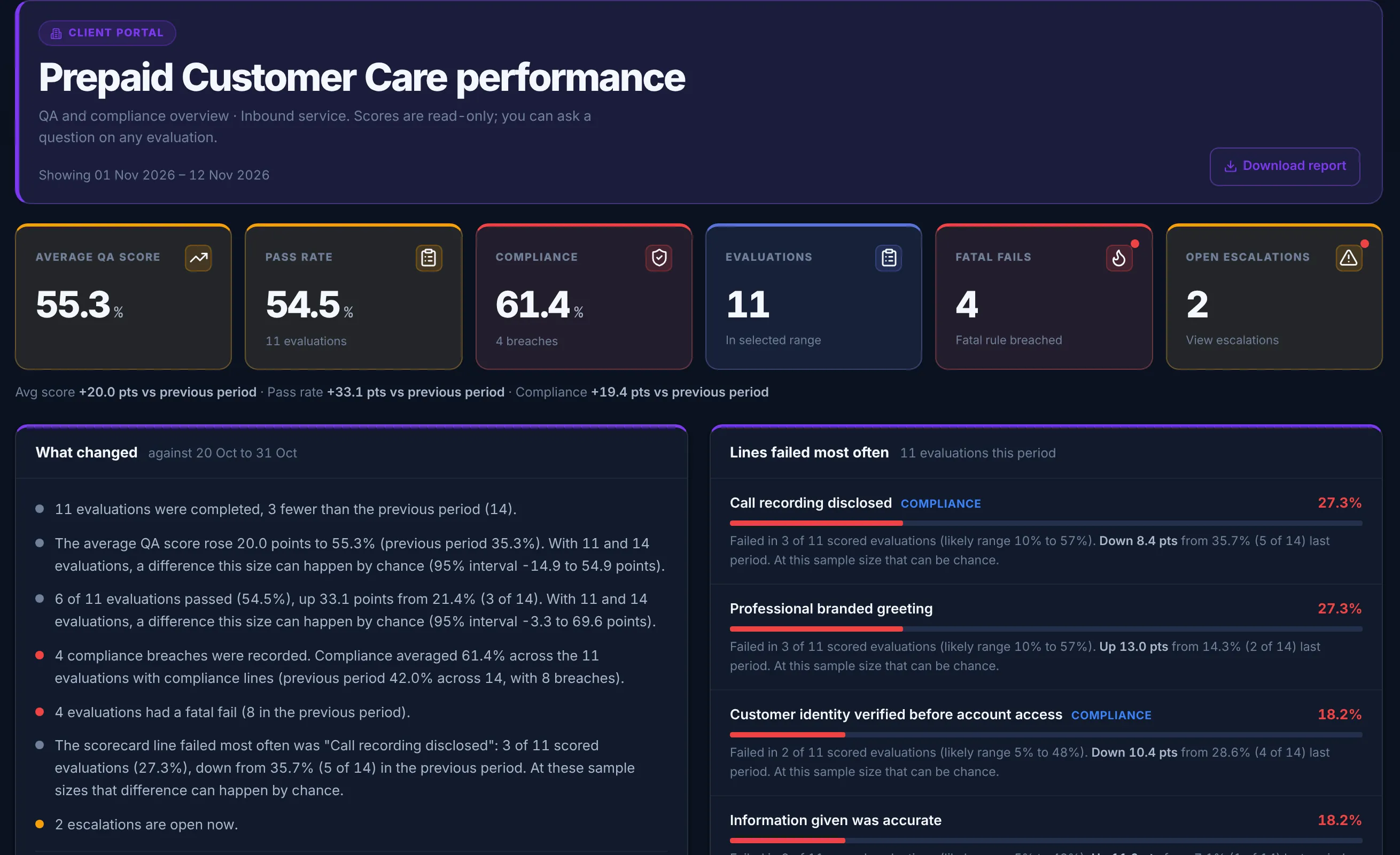
    Each client gets a login that shows only its own campaign: QA score, compliance, fatal fails and the scorecard lines failed most often. A scheduled email sends them the report, with a "what changed" summary that says when a difference is too small to read anything into.

    When a client queries an evaluation, they ask inside the portal and your QA team answers there. A question never changes the score, and the next monthly review starts from the same numbers on both sides.

    Client portal for a prepaid customer care campaign: average QA score 55.3 percent, pass rate 54.5 percent, compliance 61.4 percent, 11 evaluations, and a what changed summary that gives a 95 percent interval for each difference
    The client portal, as the client sees it. Demo workspace, sample data.
  2. Call intake

    Calls arrive in bulk or by API

    Upload a CSV manifest with the recordings, or a transcripts-only CSV, and every row comes back with its own result. Your own systems can post each call to the intake API with a company API key; QUALICORE stores only a hash of the key.

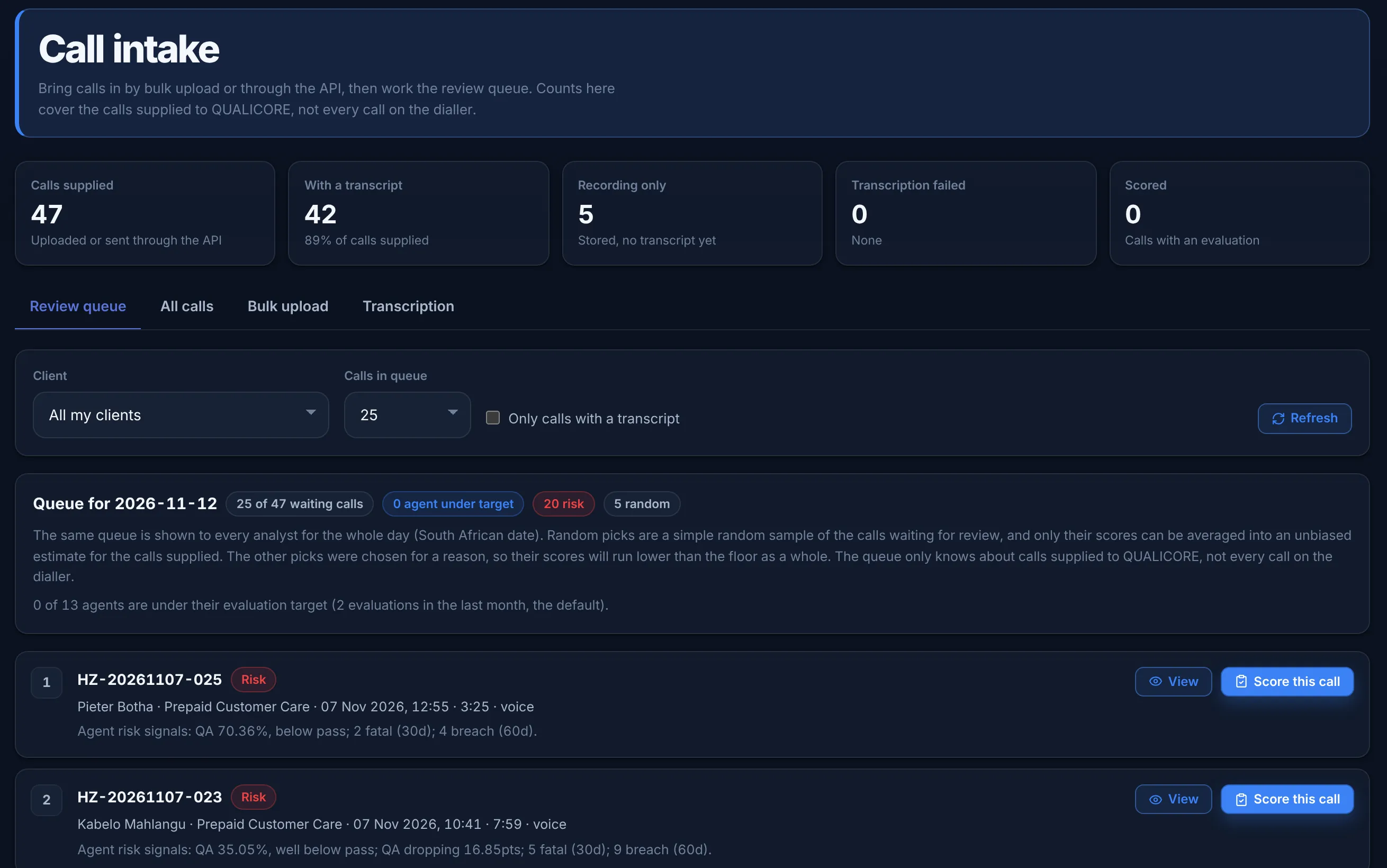
    The review queue is set once a day and labels why each call was picked: random, agent under target, or risk. Only the random picks are an unbiased sample, and the screen says so.

    API keys are on Growth and above. QUALICORE does not connect to a dialler. A recording without a transcript waits until your admin opts in to transcription and a provider key is set.

    Call intake screen: 47 calls supplied, 42 with a transcript, 5 recording only, and the review queue for the day with 20 risk picks and 5 random picks, each call labelled with the reason it was picked
    Call intake and the daily review queue. Demo workspace, sample data.
  3. For agents

    Agents come back daily

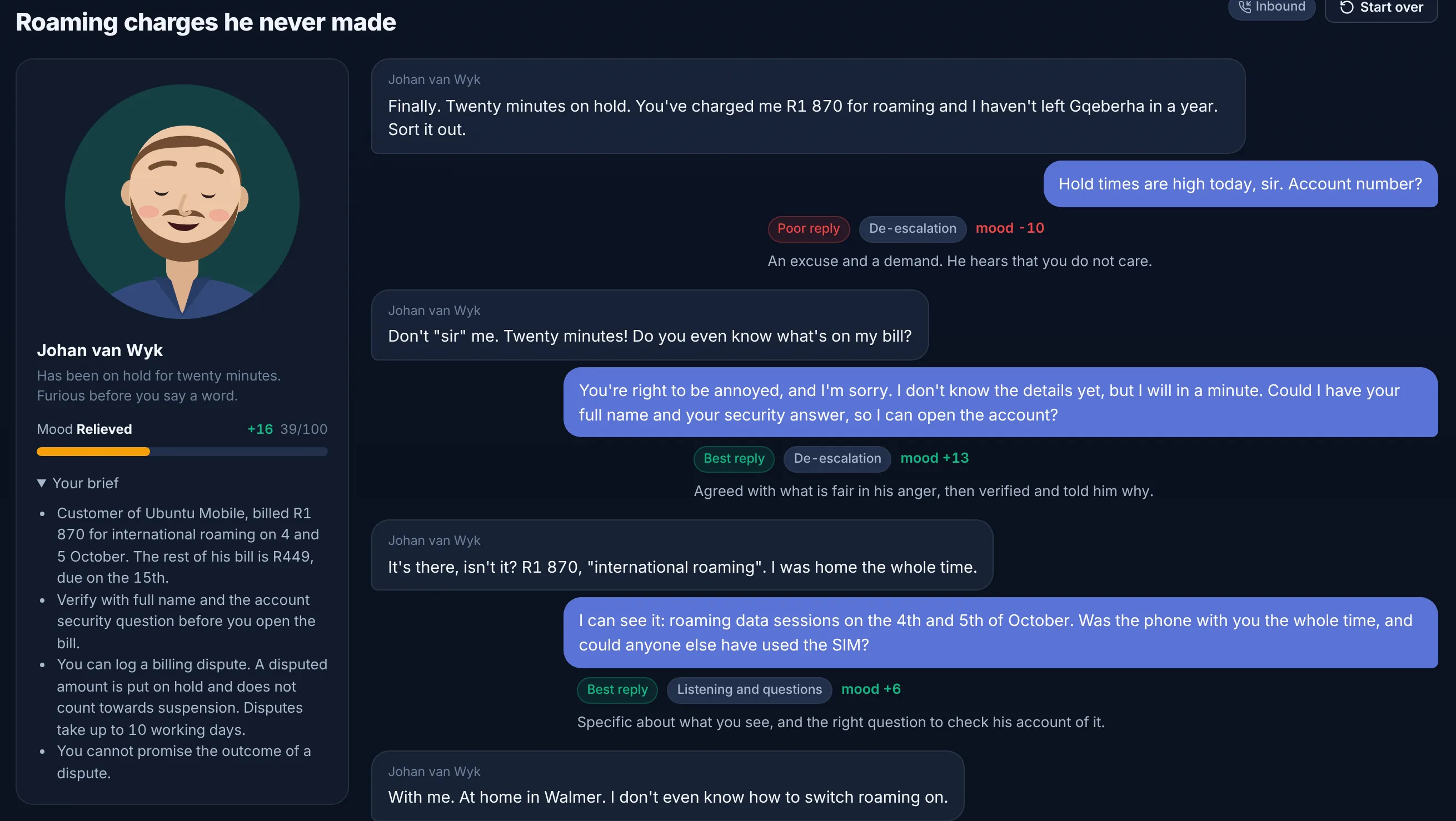
    Practice calls put an agent on the line with a customer whose mood moves with every reply, and each reply is marked with what it did and why. The daily drill takes about two minutes and asks about the agent’s own scorecard lines; the ones they miss come back sooner.

    Practice never changes a QA score. Team leaders can see how often each agent practises.

    A practice call with an upset customer about roaming charges: his mood meter reads relieved, 39 out of 100, and each agent reply is marked best or poor with the mood change it caused
    A practice call halfway through. The mood meter moves with each reply. Demo workspace.
  4. Quality Science

    Scores you can defend

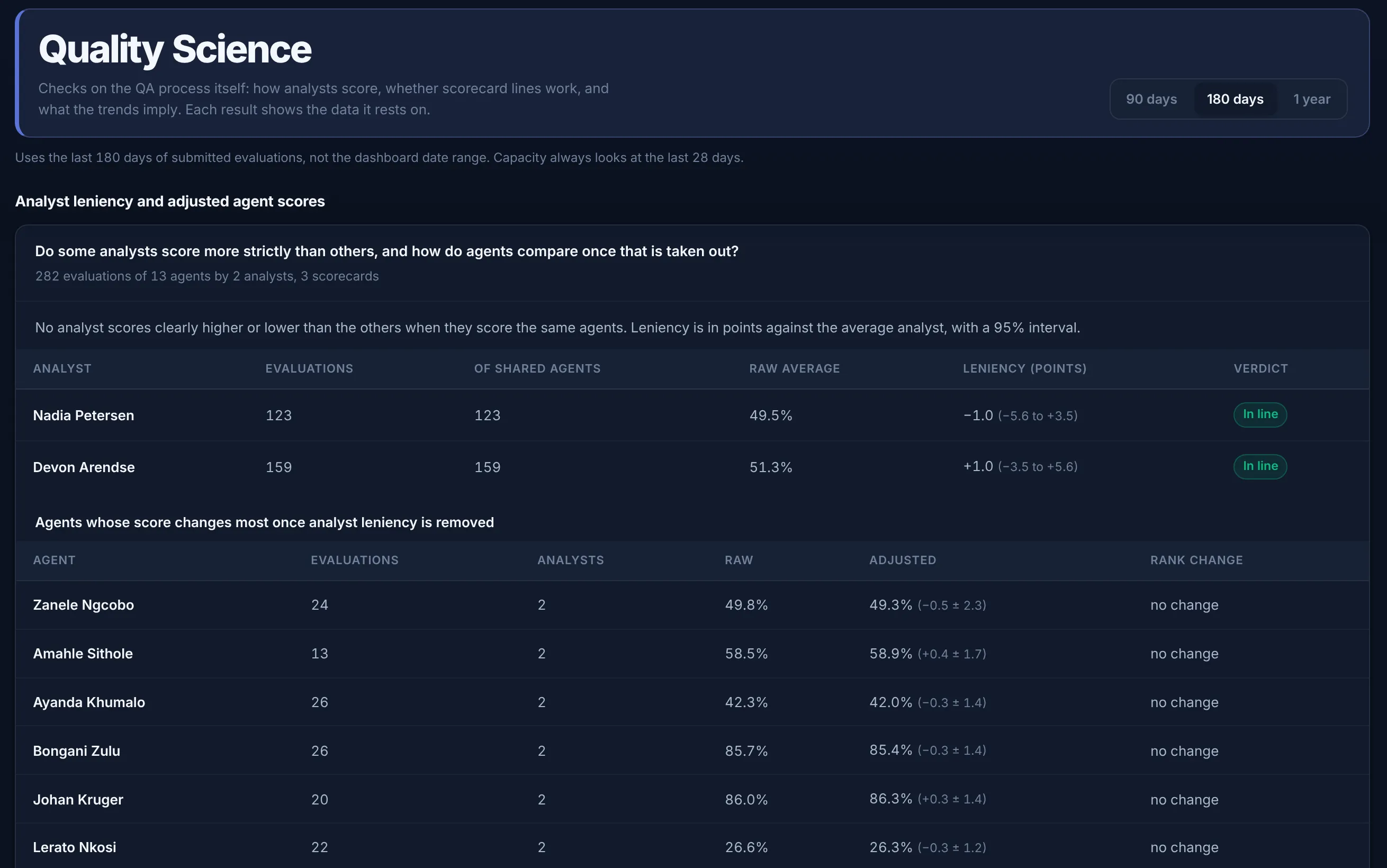
    Quality Science checks the QA process itself: whether one analyst scores more strictly than the others on the same agents, which scorecard lines do not separate good calls from weak ones, and how long agents take to reach target.

    Every result states the number of evaluations it rests on, shows a 95% interval, and says "not enough data yet" rather than guess. When a client challenges a score, you can show where it came from.

    Quality Science is on Growth and above.

    Quality Science: analyst leniency for two analysts across 282 evaluations of 13 agents, each with a 95 percent interval and an in line verdict, and agent scores before and after leniency is removed
    Analyst leniency, with the sample under every result. Demo workspace, sample data.

Universal Scorecard Engine

Add as many sections, criteria, categories and sub-categories as a scorecard needs. The engine is percentage-based, not structure-based, so it always reconciles to your pass rate and 100.

  • 3 scorecards on Starter, 15 on Growth and Professional, unlimited on Enterprise
  • Weighted, numeric and yes/no scoring
  • Fatal-fail and autofail logic per criterion
  • Real-time edits without breaking calculations
  • A new version is approved before anyone scores against it

No-Code Scorecard Builder

Build scorecards in the browser. No CSV mapping and no developer required.

  • Add criteria, weights and rules
  • Compliance criteria flagged separately
  • Categories, sub-categories and notes
  • Inline preview as you build
  • Versioned with full audit history

Automated Coaching & PDF Documentation

A failed evaluation opens a coaching plan for the agent’s supervisor. The supervisor runs the session in the platform, the agent acknowledges it, and the record can be exported as a PDF with names and dates.

  • Coaching plan opened when an evaluation fails
  • Supervisor workflow with action steps
  • Digital agent acknowledgment / sign-off
  • Branded PDF exports with timestamps
  • Full coaching history per agent

Smart Auto-Escalation

Eight triggers raise an escalation: fatal fail, auto-fail, three fails in a row, a sustained score drop, the same line failed three times in 30 days, and three stricter compliance triggers. On Growth and above.

  • 8 escalation triggers, 3 of them for compliance
  • Urgency set by the trigger
  • Routes to the right supervisor automatically
  • SLA tracking on every open escalation
  • Closed-loop reporting on resolutions

Audit-Ready Compliance

Every evaluation, coaching session, written warning and sign-off is timestamped and attributed to a person. The records support POPIA, LRA, BCEA and GDPR processes; they are not a certificate.

  • Records for POPIA, LRA, BCEA and GDPR processes
  • Audit log of each action, with a name and a time
  • Written warnings a company can keep with the evaluation
  • Client audit pack export
  • Retention length is a plan setting and is not purged unless the company turns enforcement on

Multi-Tenant by Design

Run several clients on one account: 1 on Starter, 5 on Growth and Professional, unlimited on Enterprise. Each client gets its own scorecards, users and reporting, kept apart from the others.

  • Data kept apart per client
  • A portal login for each client
  • Per-client reporting and dashboards
  • Your logo on client reports on Enterprise
  • Role-based access across tenants

Live Dashboards & Reporting

Supervisors and admins see pass rate, fatal-fail count, coaching backlog and trends as soon as an evaluation is submitted, without spreadsheets.

  • Real-time supervisor dashboard
  • Agent leaderboards with weekly cohorts
  • Trend charts with month-on-month deltas
  • Drill-down to underlying evaluations
  • CSV / PDF / scheduled email export

AI That Works Quietly in the Background

QUALICORE AI drafts coaching suggestions and evaluation feedback, and flags risk. A person decides what is kept. AI features need an AI provider key.

  • AI-drafted coaching notes
  • Pattern detection across cohorts
  • Evaluation feedback summaries
  • Lead and applicant scoring
  • Always optional — humans still own the decision

Automated Billing & Invoicing

Invoices generated automatically every month from active-agent counts. No manual seat counting, no chasing finance for a quote.

  • Per-active-agent billing only
  • Volume discounts auto-applied
  • Branded invoice + receipt PDFs
  • Bank, EFT, Yoco card and Stripe support
  • Billing statements

Onboarding, Step by Step

Request access and a person provisions the workspace. You then build or import your scorecards, add users, and submit the first evaluation. No consultants, no rip-and-replace.

  • Help moving existing scorecards, on request
  • Bulk user import via CSV
  • Email and password sign-in. SSO is not a working login in this release
  • In-product onboarding tour
  • Hands-on help while you set up

Feature spotlight

Coaching plans and PDF records

QUALICORE turns coaching into a tracked workflow. A failed evaluation opens a coaching plan, the supervisor’s actions are recorded, and each session can be exported as a PDF with names and dates.

What this feature does

  • A coaching plan opens when an agent fails an evaluation
  • Supervisor workflow inside the platform, without spreadsheets or email chains
  • Digital agent acknowledgment, creating a verifiable record of corrective action
  • One-click branded PDF exports for every coaching session, plan and sign-off
  • Full coaching history with timestamps for every interaction

Perfect for

  • BPOs with strict client requirements
  • Call centres preparing for audits
  • Teams needing transparent, documented coaching
  • Operations leaders who want real accountability

Feature spotlight

Build scorecards without code

Add criteria, weights, scoring types, autofail rules and compliance checks in the editor. The percentage-based scoring engine works for a five-line script check or a long enterprise scorecard without recoding the maths.

What this feature does

  • 3 scorecards on Starter, 15 on Growth and Professional, unlimited on Enterprise
  • Autofail and fatal-fail logic via simple toggles
  • Weighted, numeric and yes/no scoring side-by-side
  • Categories, sub-categories and inline notes
  • Compliance criteria flagged separately and reported on independently
  • Real-time edits with no broken formulas

Perfect for

  • BPOs juggling many client scorecards
  • Operations leaders rolling out new scripts
  • Teams migrating off Excel or another QA tool
  • Compliance teams enforcing fatal-fail rules

See it on your own scorecards.

Ask for help moving a scorecard when you start the trial. A person sets up the workspace; there is no published go-live time.