Score the call you submit. Coach the ones that need it.
QUALICORE is contact centre quality assurance software. Give it the interaction and AI drafts the scorecard, with a separate compliance score. A person signs off before anything counts. Coaching and reporting follow that evaluation.
Made in Cape TownPrices in rand, excl. VATA login for each clientA person signs every score
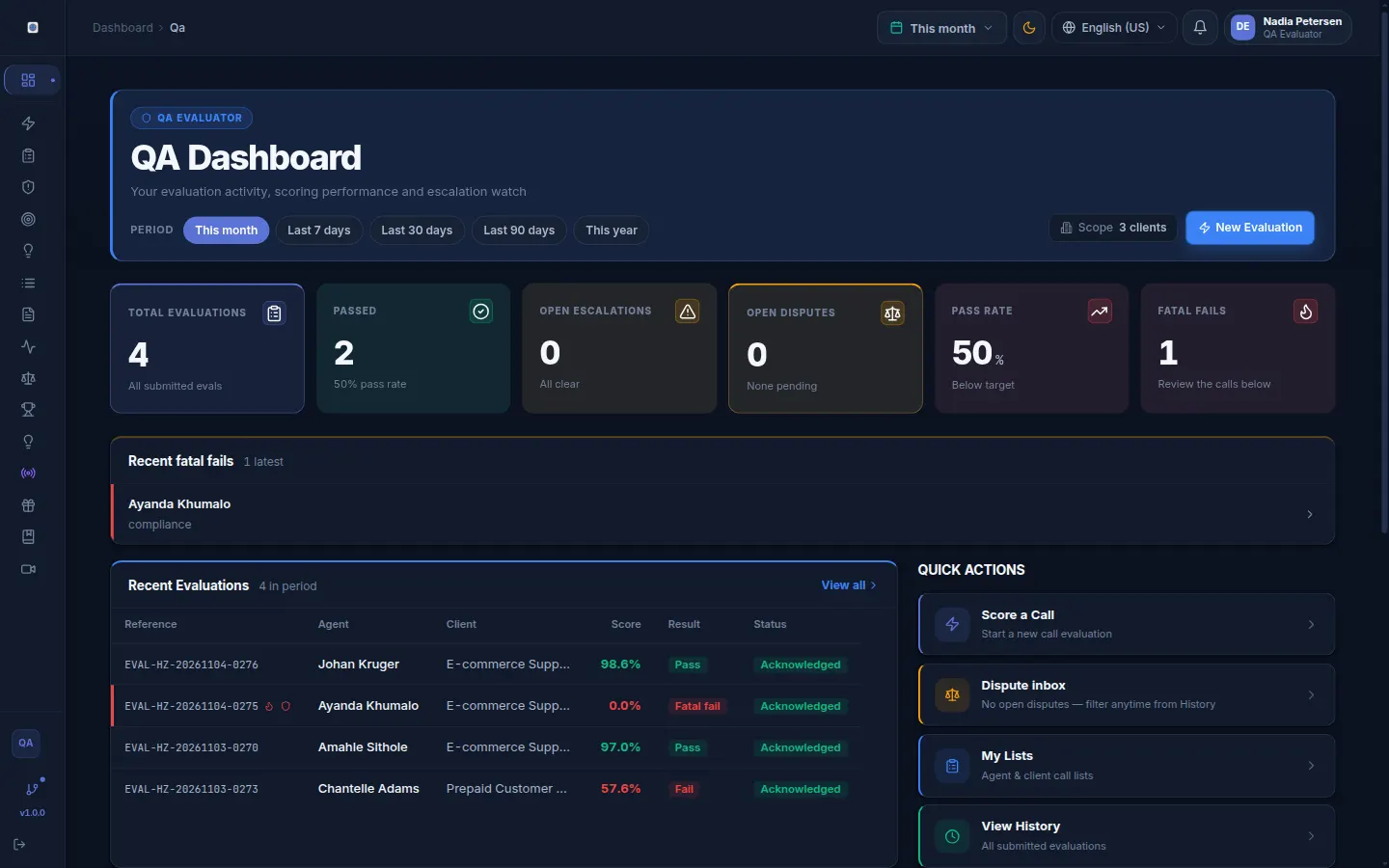
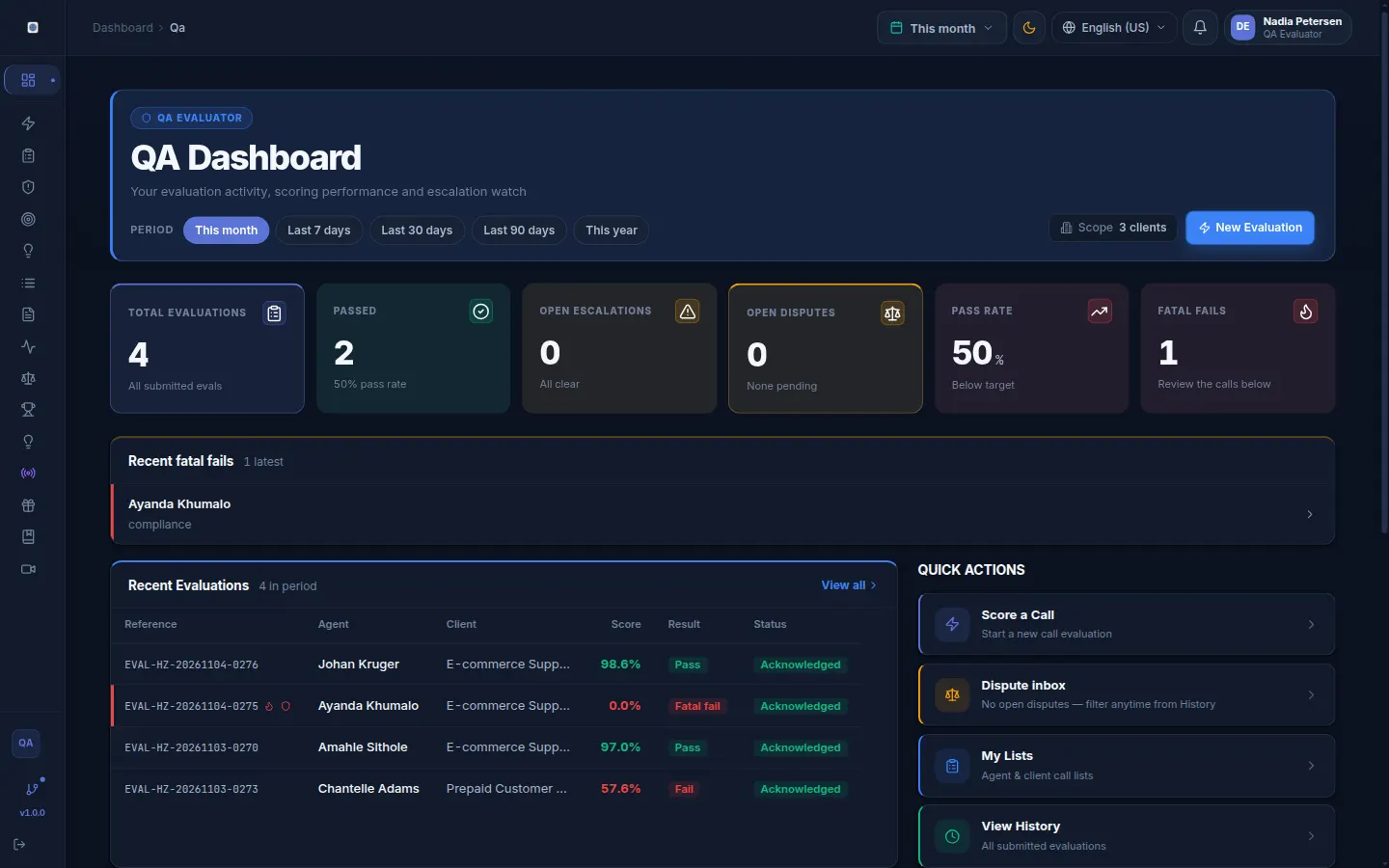
The QA dashboard in the demo workspace. Sample data.
On screen
How a call is reviewed, step by step
Four steps, from the call you hand over to the coaching record the agent signs. The screens are from the demo workspace.
01
You submit the call.
Upload the recording or paste the transcript, one at a time, in bulk from a CSV, or through the intake API, then pick the client, the scorecard and the agent. QUALICORE does not pull calls from your dialler. A recording is transcribed only if your admin opts in and a provider key is set; otherwise the AI draft waits for a transcript.
The call
A recording, a transcript, or both
The reference
Your own call or ticket number
The context
Client, scorecard and agent
02
AI drafts. A person decides.
The draft answers every line of your scorecard. Where it cites the call, the quote is matched word for word against the transcript. An analyst checks each line, changes what is wrong and submits under their own name.
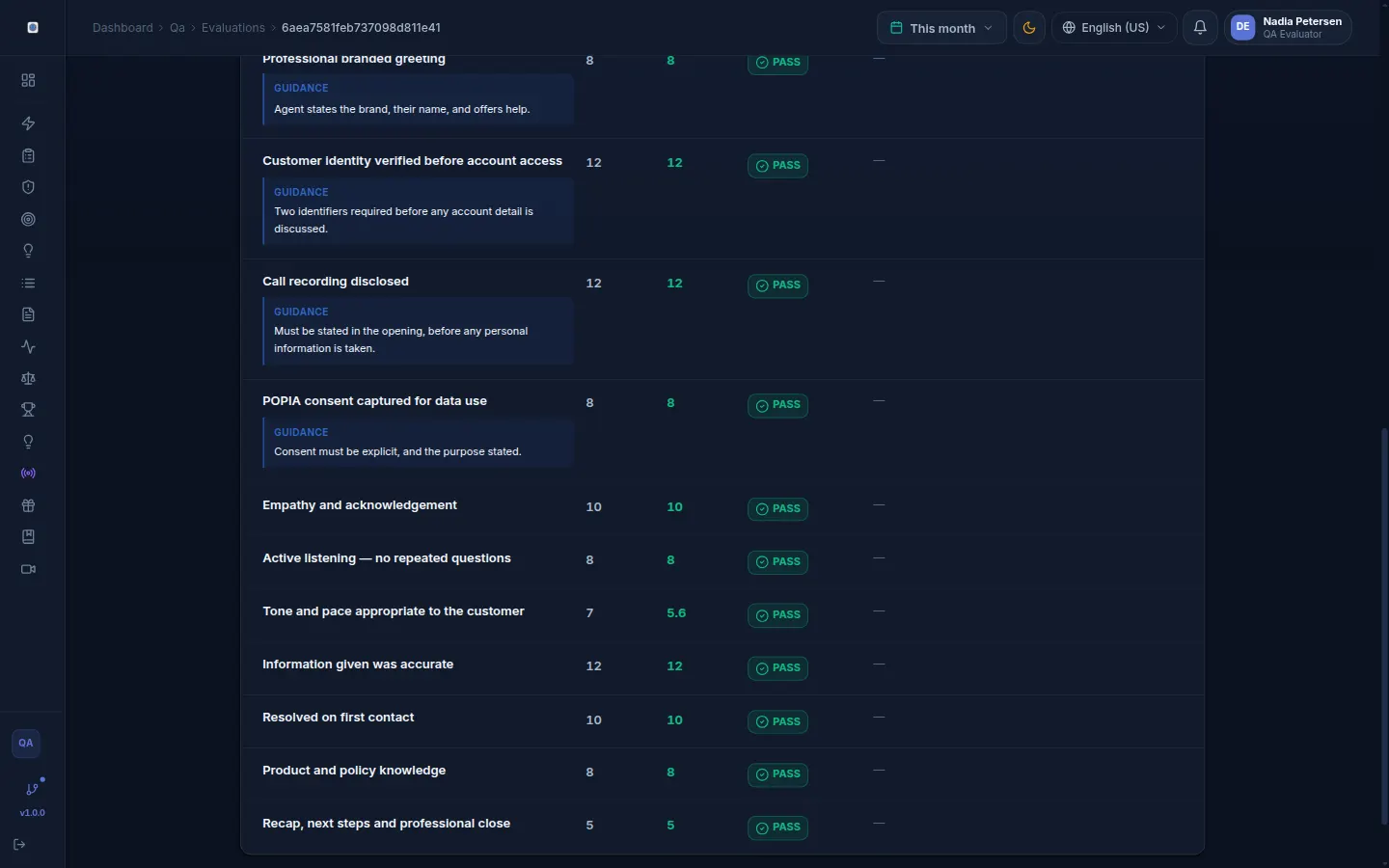
Each criterion with its guidance, the points available and the points awarded.
03
Two results, kept apart.
The quality score comes from your weighted criteria. The compliance result comes only from the lines you mark as compliance. A fatal line fails the evaluation whatever the total says, and the same call reference cannot be scored twice outside calibration.
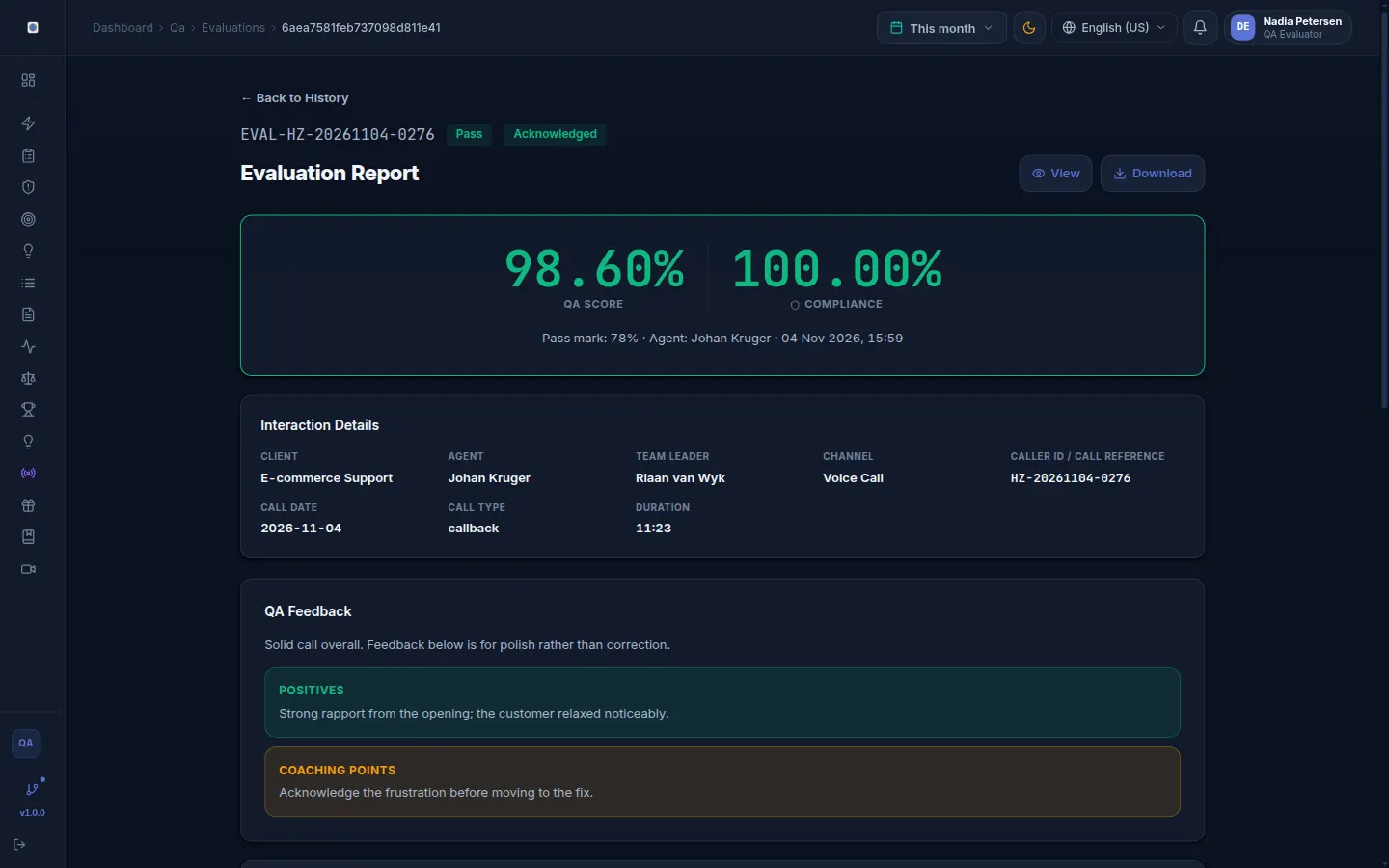
One submitted evaluation: QA score and compliance result side by side.
04
A fail reaches a supervisor.
On plans with escalations, a fatal or repeated fail raises one. The supervisor opens a coaching plan and the agent acknowledges it in the product, with a timestamp. The coaching report compares average scores before and after a session. It is a comparison, not proof of cause.
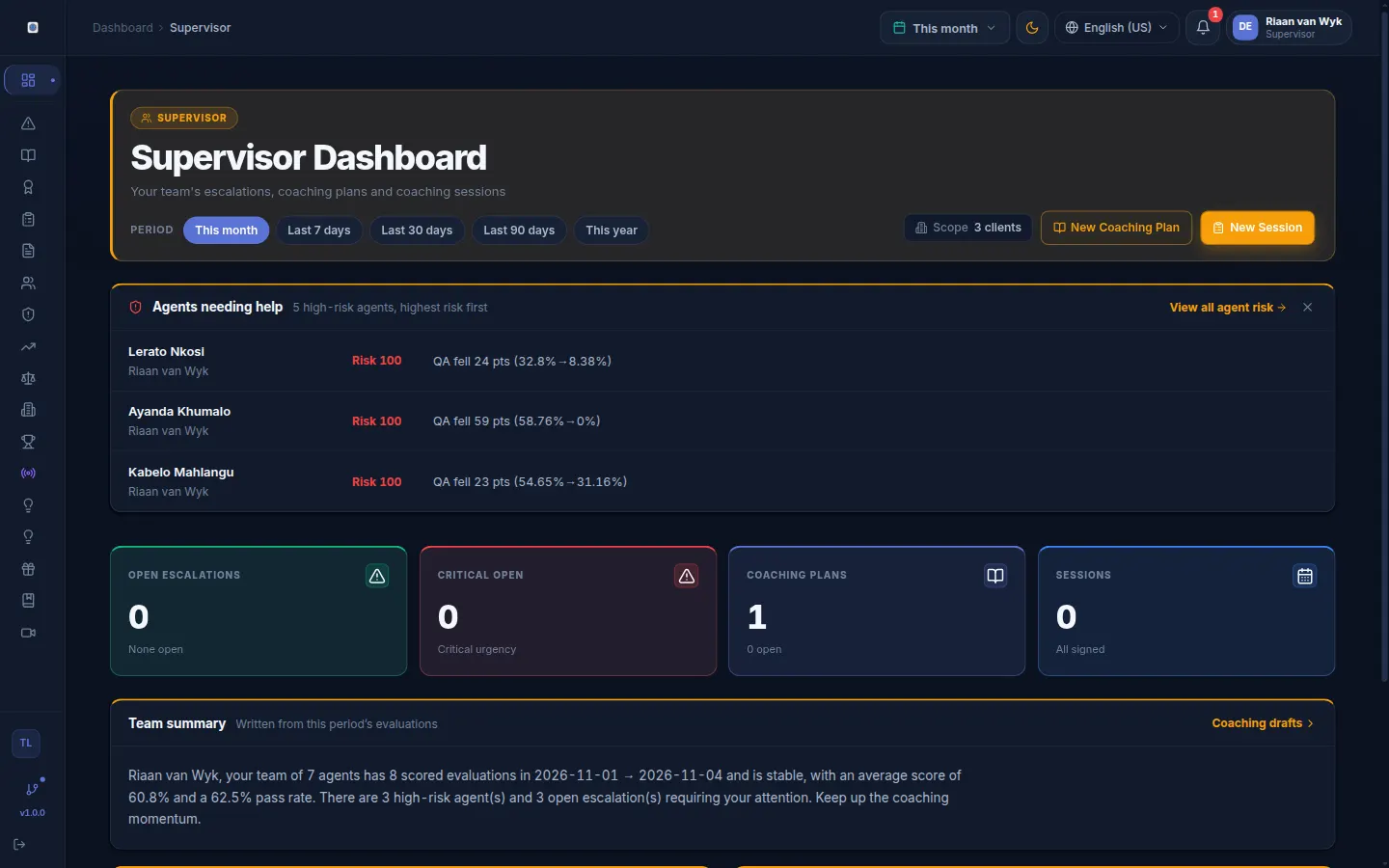
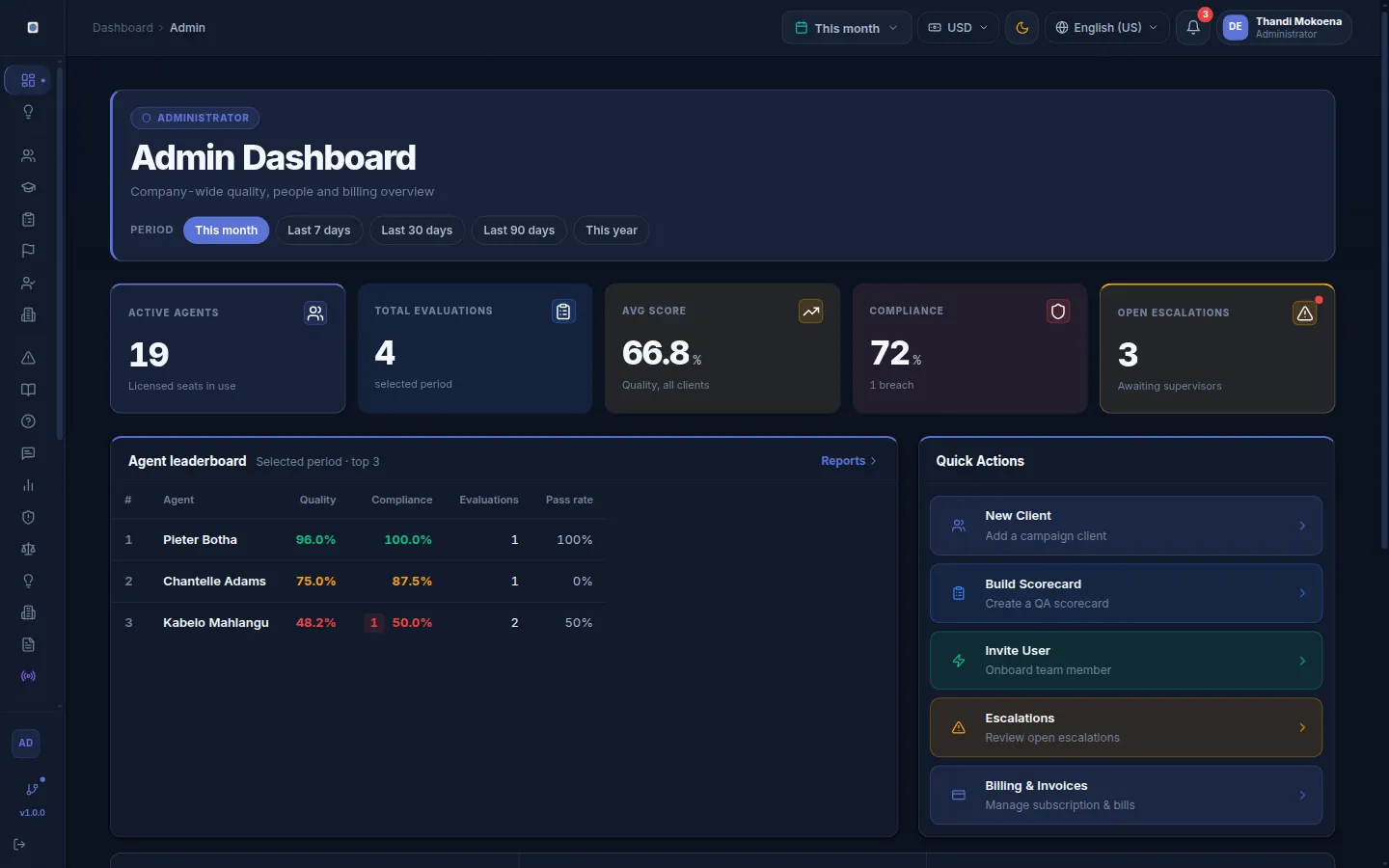
The supervisor view: the agents whose scores fell furthest, then open escalations and coaching plans.
What is different
Built for a BPO that has to answer to its clients
Four parts of QUALICORE that a scorecard tool on its own does not give you. Every screen below is the demo workspace with sample data.
For your clients
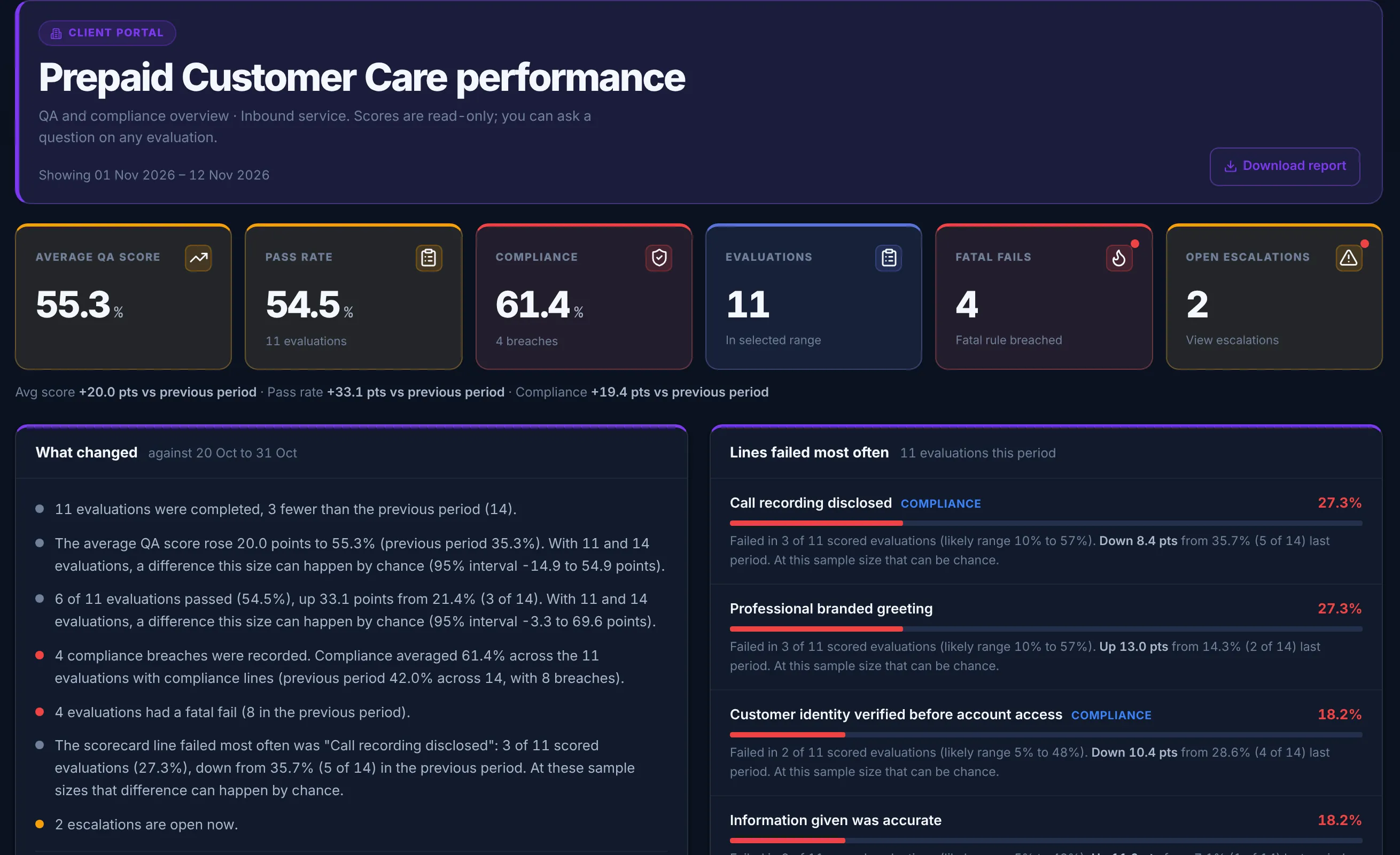
Your clients log in too
Each client gets a login that shows only its own campaign: QA score, compliance, fatal fails and the scorecard lines failed most often. A scheduled email sends them the report, with a "what changed" summary that says when a difference is too small to read anything into.
When a client queries an evaluation, they ask inside the portal and your QA team answers there. A question never changes the score, and the next monthly review starts from the same numbers on both sides.
The client portal, as the client sees it. Demo workspace, sample data.
Call intake
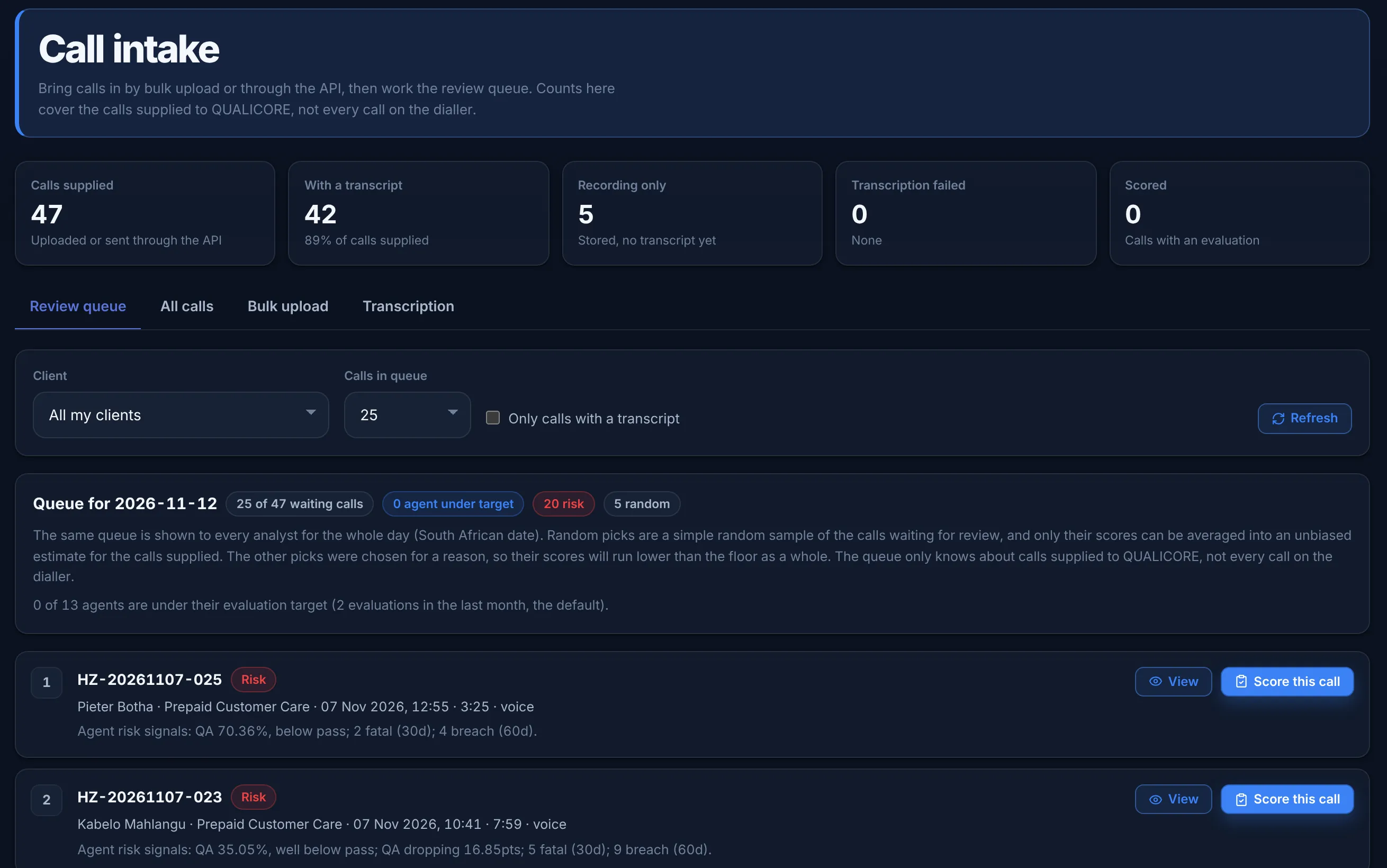
Calls arrive in bulk or by API
Upload a CSV manifest with the recordings, or a transcripts-only CSV, and every row comes back with its own result. Your own systems can post each call to the intake API with a company API key; QUALICORE stores only a hash of the key.
The review queue is set once a day and labels why each call was picked: random, agent under target, or risk. Only the random picks are an unbiased sample, and the screen says so.
API keys are on Growth and above. QUALICORE does not connect to a dialler. A recording without a transcript waits until your admin opts in to transcription and a provider key is set.
Call intake and the daily review queue. Demo workspace, sample data.
For agents
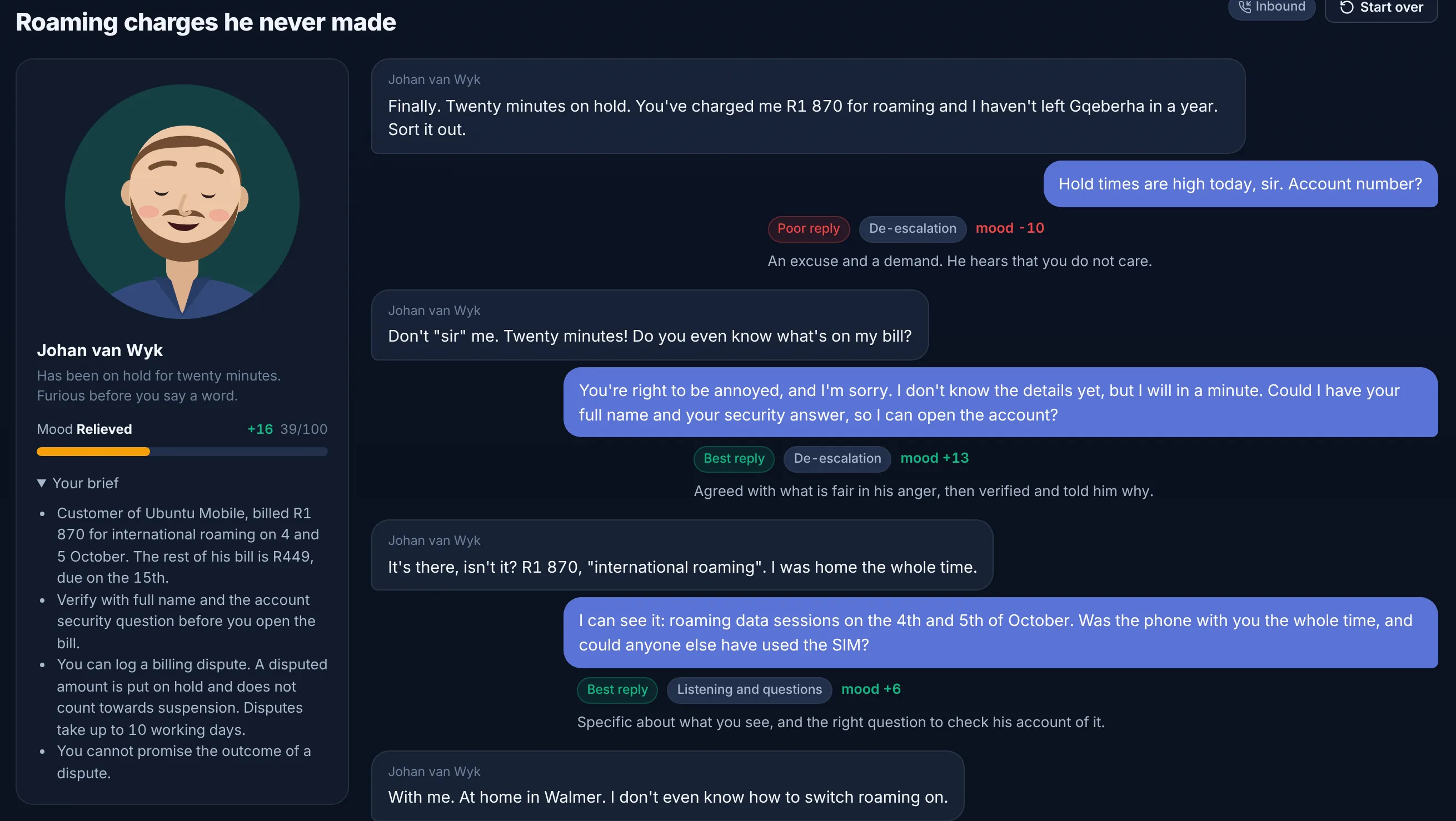
Agents come back daily
Practice calls put an agent on the line with a customer whose mood moves with every reply, and each reply is marked with what it did and why. The daily drill takes about two minutes and asks about the agent’s own scorecard lines; the ones they miss come back sooner.
Practice never changes a QA score. Team leaders can see how often each agent practises.
A practice call halfway through. The mood meter moves with each reply. Demo workspace.
Quality Science
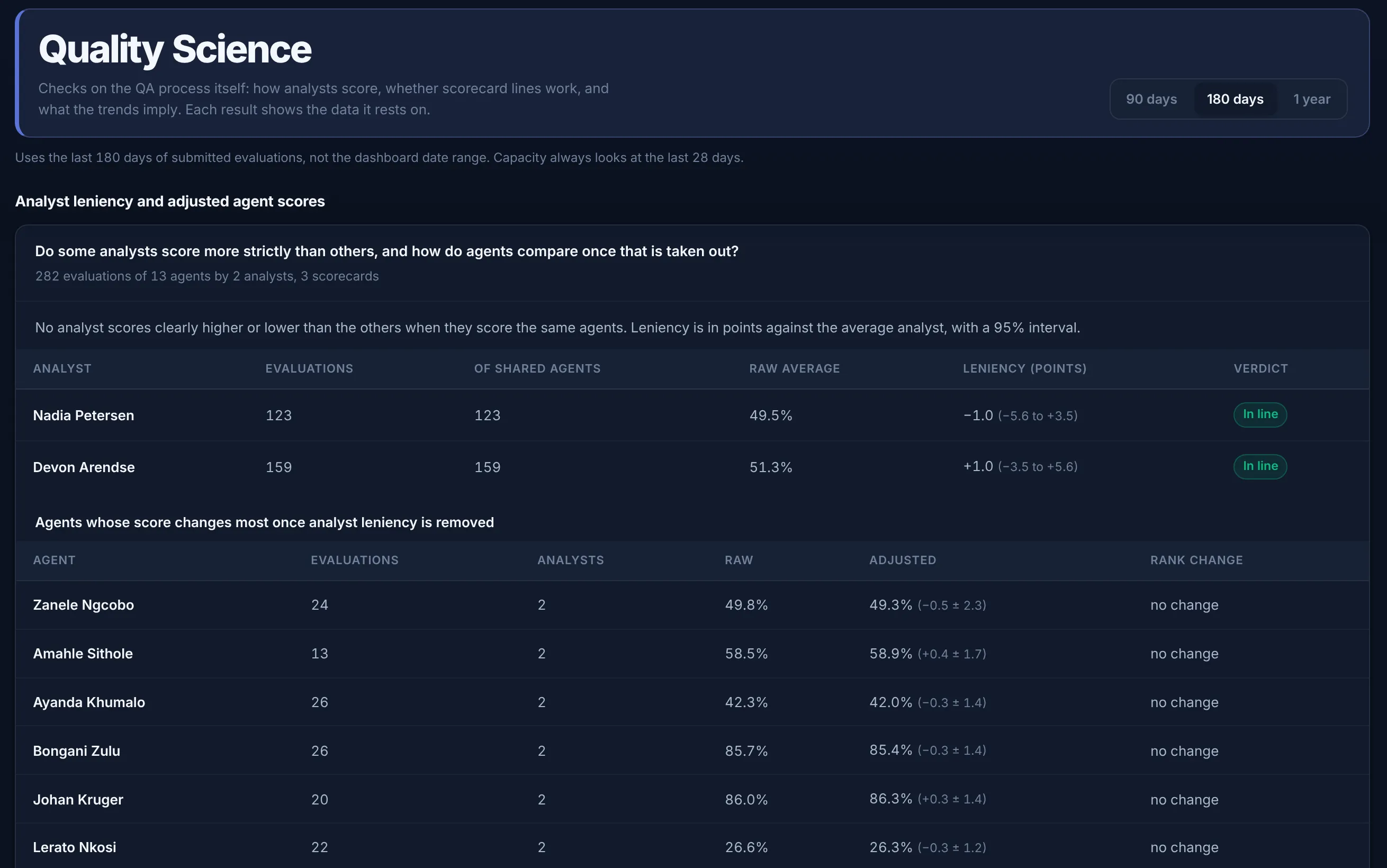
Scores you can defend
Quality Science checks the QA process itself: whether one analyst scores more strictly than the others on the same agents, which scorecard lines do not separate good calls from weak ones, and how long agents take to reach target.
Every result states the number of evaluations it rests on, shows a 95% interval, and says "not enough data yet" rather than guess. When a client challenges a score, you can show where it came from.
Quality Science is on Growth and above.
Analyst leniency, with the sample under every result. Demo workspace, sample data.
QUALICORE
Smarter QA. Stronger performance.
AI drafts the scorecard, a person submits it
Dashboards per role and per client
Coaching that follows a failed evaluation
A named record of every evaluation
The campaign banner. What each part means in practice is set out below.
Product
Score the call you submit.
The QA floor, the scorecard, and who needs a coach. Nothing is spoken. The screens are the real ones.
Reviews
What the published reviews say
Independent write-ups, scored and quoted the way software directories publish a review. Each card links to the full page.
These are short fictional examples of the calls our teams handle and the checks supervisors can review afterwards.
Fictional examples for demonstration only. No real customer data.
Example call
Inbound customer support
Delivery delay resolved with empathy and clear next steps
92% review
✓Greeting and verification
✓Empathy and ownership
✓Clear recap and next steps
Supervisor noteOffer proactive delivery updates earlier in the conversation.
View transcript
Agent: Good morning, thank you for calling Northstar Home Supplies. My name is Maya. How may I help you today?
Customer: My delivery was due yesterday, but the tracking page still says it is being processed. It is for a birthday this weekend, so I am concerned.
Agent: I understand why that would be worrying, especially with a deadline coming up. I will check the order status and see what options we have.
Customer: Is there anything you can do if it does not arrive tomorrow?
Agent: Yes. We can arrange a replacement or a refund review if the delivery is missed. I have also added a priority note for the occasion date.
Customer: I appreciate that. Thanks for taking it seriously.
Agent: You are welcome. To recap, the parcel is scheduled for delivery tomorrow, and we can review replacement or refund options if needed.
Example call
Outbound lead generation
Consultative prospecting call that earns a discovery appointment
95% review
✓Permission-based opening
✓Needs discovery
✓Appointment setting
Supervisor noteConfirm the prospect’s preferred follow-up channel before closing.
View transcript
Agent: Hi Daniel, my name is Jordan from ClearPath Business Services. I will be brief. Do you have thirty seconds for me to explain why I called?
Prospect: I am between meetings, but go ahead.
Agent: We provide a trained customer-care team that answers routine questions, qualifies enquiries, and books appointments under your brand.
Prospect: That is a problem for us, especially after hours. How does the handover work?
Agent: We follow your approved script and escalation rules, capture lead details in your preferred system, and send a daily summary.
Prospect: A pilot could be useful. What would you need from us?
Agent: A short description of your customer journey, business hours, enquiry types, and success measures. I can arrange a fifteen-minute discovery call this week.
Example call
Collections and compliance
Respectful payment-arrangement discussion with safety controls
98% review
✓Privacy-safe verification
✓Affordability language
✓No card data captured
Supervisor noteMaintain the same calm pace when confirming the proposed arrangement.
View transcript
Agent: Before we continue, I need to confirm that I am speaking with the correct person. Could you confirm only the month of your birth, please?
Customer: September.
Agent: I am calling about a fictional outstanding balance of four hundred and eighty dollars. This call is to discuss options, not to pressure you. Is now an appropriate time to talk?
Customer: I cannot pay the full amount this month.
Agent: We can review an affordable arrangement based on what you can manage. I will not ask you to agree to an amount that would cause financial difficulty.
Customer: I could pay one hundred and twenty dollars on the fifteenth of each month.
Agent: Please do not share your full card number or security code during this call. I will submit the proposed arrangement for review and written confirmation will follow.
The recordings are synthetic demonstrations, not client testimonials or real customer interactions.
“EconX Group runs every BPO campaign on QUALICORE: QA scoring, audit trails and coaching across all agents.” Philani Chade Maswanganye, Founder & CEO · ECONX GROUP, which owns QUALICORE
Outbound links only. A directory page is not an award, a certification, or a customer count.
4
Plans with published rand prices
1
Portal login per client
8
Escalation triggers
95%
Interval on every Quality Science result
Platform
What the platform does
AI evaluation drafts, live guardrails, coaching, agent risk, compliance and billing in one product. Some parts need an AI key or a higher plan, and each card says so.
AI Auto-QA
Paste a call transcript and the AI drafts your whole scorecard: every criterion in its own scale, a rationale on every line, comments, coaching points and fatal details filled in. A person reviews and submits it; nothing is saved without them. Needs an AI key.
Live QA Scoring
Score any call in minutes with weighted criteria, fatal-fail detection, and auto-escalation. A live score thermometer and compliance indicator update as you score.
Compliance Score & Radar
A second, independent score from your compliance-linked criteria. A fatal breach voids it to 0% and escalates on stricter rules than QA. Ops get a Compliance Radar with breach rate, exposure and the agents with most breaches, plus an Excel pack.
Real-Time Live Assist
Guardrails while the call is happening: card-number (PCI) and do-not-call detection, an obligations checklist from your own scorecard, and short AI nudges when an AI key is set. The guardrails work with no AI key at all.
Smart Auto-Escalation
Eight triggers raise an escalation with an SLA deadline: fatal fail, auto-fail, three fails in a row, a sustained score drop, the same line failed three times in 30 days, and three stricter compliance triggers. On Growth and above.
Coaching Plans + Coaching ROI
A failed evaluation opens a coaching plan for the agent's supervisor, and the agent acknowledges it in the product. Coaching ROI compares scores before and after a session. It does not prove the coaching caused the change.
Agent Risk Early Warning
A 0 to 100 risk score per agent from QA trend, fatal fails, compliance breaches, escalation load, coaching load and tenure, with the drivers and a suggested next step, sorted worst first.
QA Intelligence Engine
Five explainable checks on your own data: evaluator calibration and drift, dispute likelihood, coaching timing, call-duration outliers, and how CSAT tracks QA. Each shows the data it used.
Executive Team Performance
A client, team leader and agent view of QA, compliance, fatal errors, coaching, training and certificates, with drill-down to any agent and a grouped Excel export.
Performance Certificates & Badges
Operations set up recognition awards such as Top Performer or Zero Fatal Errors and the conditions for each. QUALICORE picks the winners from the data and issues a certificate with QR verification and a profile badge.
Built-in LMS & Trainer Hub
Course builder, quizzes, progress tracking and training certificates with QR verification. A coaching plan can assign the matching course for the weak area.
Ask Your QA Data
Ask a question about your own numbers: pass rates, failing lines, agent risk, coaching. The answer cites the figures and says so when the data does not cover the question. Needs an AI key.
AI Scorecard Builder
Paste a QA policy or call guideline and get a ready-to-edit scorecard: sections, weighted criteria, scoring types, fatal and compliance flags. Or start from built-in FCR, CSAT and Complaints templates.
Records for POPIA and labour reviews
Evaluations, warnings and coaching acknowledgements are timestamped and attributed. That record is not a POPIA certificate or a legal opinion.
Automated Billing & Invoicing
Monthly invoices from the active-agent count, with statements, credits and proration. Card payment through Stripe, Yoco or PayFast where it is set up.
Reports and exports
Excel and PDF packs built fresh on every download: monthly QA score, team performance, disputes, compliance evaluations and billing statements.
Multi-Tenant by Design
Each client gets its own scorecards, users, reporting and portal login, kept apart from every other client, with role dashboards for QA, supervisors, agents, ops, admins and account managers.
Audit log
Evaluations, AI drafts, coaching sessions, warnings, sign-offs and exports are timestamped and attributed to a person. The log is not a certified archive.
QUALICORE AI
AI that drafts. People who decide.
Every AI output in QUALICORE is a draft a person approves. It is scored by the same engine as a manual evaluation, with a rationale on every line and an entry in the audit log. AI features need an AI provider key.
01
Feed it the call
Paste the transcript, send it through the intake API, or let QUALICORE transcribe the recording if your admin has opted in. Pick the client, scorecard and agent.
02
AI scores your actual scorecard
Every criterion is answered in its own scale (yes/no, partial, 1 to 5) using only evidence in the transcript, with a one-line rationale. A quote is kept only when it matches the transcript word for word. Lines you mark as compliance feed the separate compliance score.
03
Everything arrives pre-filled
Per-criterion comments on every line (prefixed “AI:”), coaching points, positive notes, fatal category and reason, auto-fail details, the QA % and Compliance % preview. Nothing is saved yet.
04
A human signs off
One click loads it into the standard evaluator. The QA reviews line by line, changes anything, and submits through the normal flow, with their name on the evaluation and the AI’s comments marked as such.
Live Assist whisper
Short nudges during the call: a missed verification, empathy when the customer is upset, a next step. The fixed PCI and do-not-call guardrails run with no AI key.
Ask your QA data
Plain-language answers from a snapshot of your own numbers. It says so when the data does not cover the question.
Policy → scorecard
Paste a policy document; get sections, weighted criteria, scoring types and fatal/compliance flags as an editable draft.
Coaching ROI & Agent Risk
Plain arithmetic, no language model: scores before and after coaching (a comparison, not proof of cause), and a 0 to 100 early warning per agent with its drivers.
Human sign-off on every AI evaluation Same scoring engine as manual QA Every AI draft is audit-logged Guardrails work with no AI keys at all
One platform, every seat
A purpose-built dashboard for every role
Each role sees what it needs. Permissions are per role, and data is kept apart per client.
QA Evaluators
Score calls or run AI Auto-QA, manage evaluation lists, handle disputes, and get an AI weekly brief.
Team Leaders
Escalations, coaching plans, sessions and warnings, agent risk, Coaching ROI, and AI coaching drafts.
Agents
Their evaluations and disputes, coaching sign-off, leaderboard, performance, and personal AI coaching.
Portfolio health scoring, churn signals, renewal pipeline, upsell, usage heatmaps and MBR reports.
Customer Service
Company management, collections toolkit, billing support and churn-risk AI — without touching QA.
Trainers
Build courses and quizzes, AI-generate assessments, track learning progress, and issue training certificates with QR verification.
Client Portal
A login for each of your clients that shows only its own QA and compliance results, trends and scheduled reports. Clients can ask a question on an evaluation; the score stays as it is.
Super Admin
Companies, plans, billing, payments, revenue, payroll, careers, AI health and the full audit log.
Real product · Score a Call
Watch a call get scored and submitted
Captured in the demo workspace: Call Details, criterion YES scores with the live thermometer, QA feedback, then Submit to a 100% PASS on Acme Collections.
This is the actual Score Call screen your evaluators use, with the same sectioned scorecard, Max-points circles, per-line PASS / FAIL result bars and the live thermometer. Rate each criterion Yes / Partial / No and watch the QA score, compliance score and pass/fail/fatal result update in real time.
QUALICORE· Score CallLIVE DEMO · NO LOGIN
Client
Acme Retentions
Scorecard
Retentions QA v3
Call Reference
REF-48217
T
Agent
Thandi M.
1
Opening & Compliance
0/3 scored0/45 pts
#CriterionMaxScore
1
Professional greeting & branding
Guidance
Agent states name, company and a warm opening within the first 10 seconds.
Max
10pts
2
🛡 ComplianceVerified customer identity (POPIA)
Guidance
At least two identifiers confirmed before any account information is shared.
Max
15pts
3
⛔ FATAL🛡 ComplianceGave mandatory disclosure
Guidance
Required regulatory disclosure read in full — omission is a fatal compliance breach.
Max
20pts
2
Resolution & Close
0/3 scored0/55 pts
#CriterionMaxScore
4
Accurate product knowledge
Guidance
Information given is correct, complete and matches the current knowledge base.
Max
20pts
5
Empathy & active listening
Max
15pts
6
Correct call closing & next steps
Guidance
Recaps resolution, confirms next steps and closes with branding.
Max
20pts
🛈 Score each criterion to see the final result. Fatal criteria zero the whole evaluation — try answering “No” on the disclosure.
✦Live Score
0.0%
Pass: 80%
Pending
🛡 Compliance
0.0%
2 criteria
Progress0/6
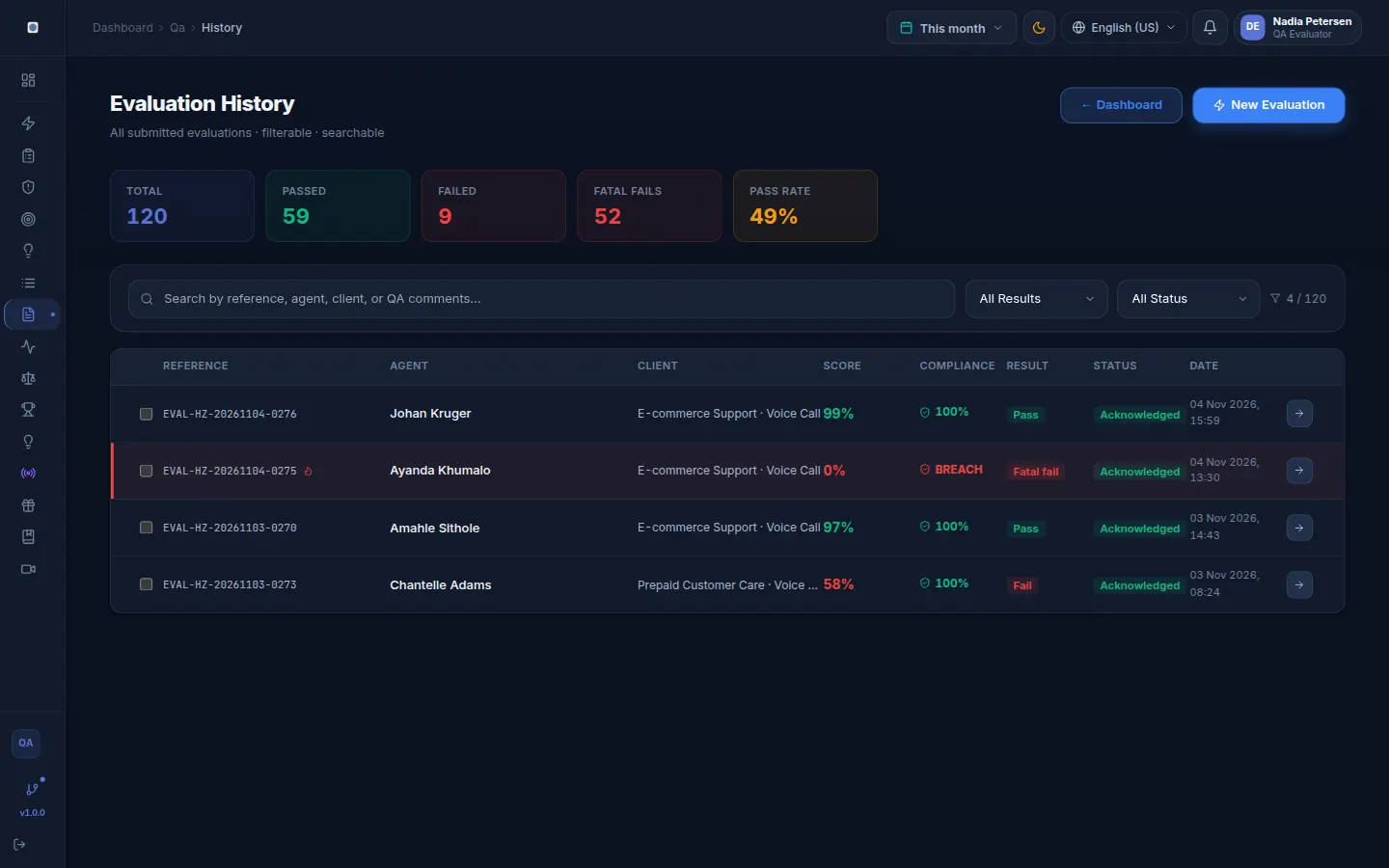
Inside the product
The screens your team would use
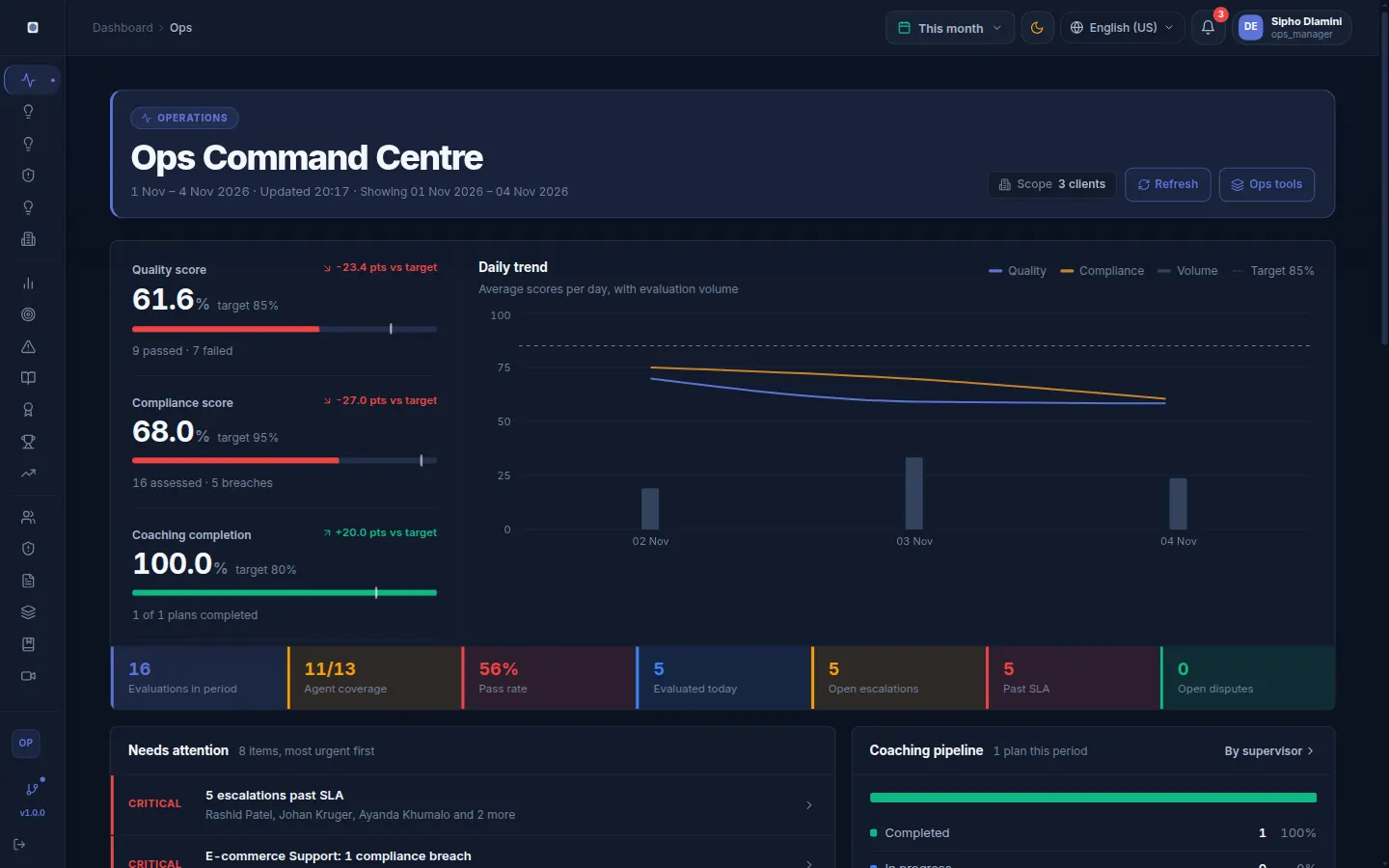
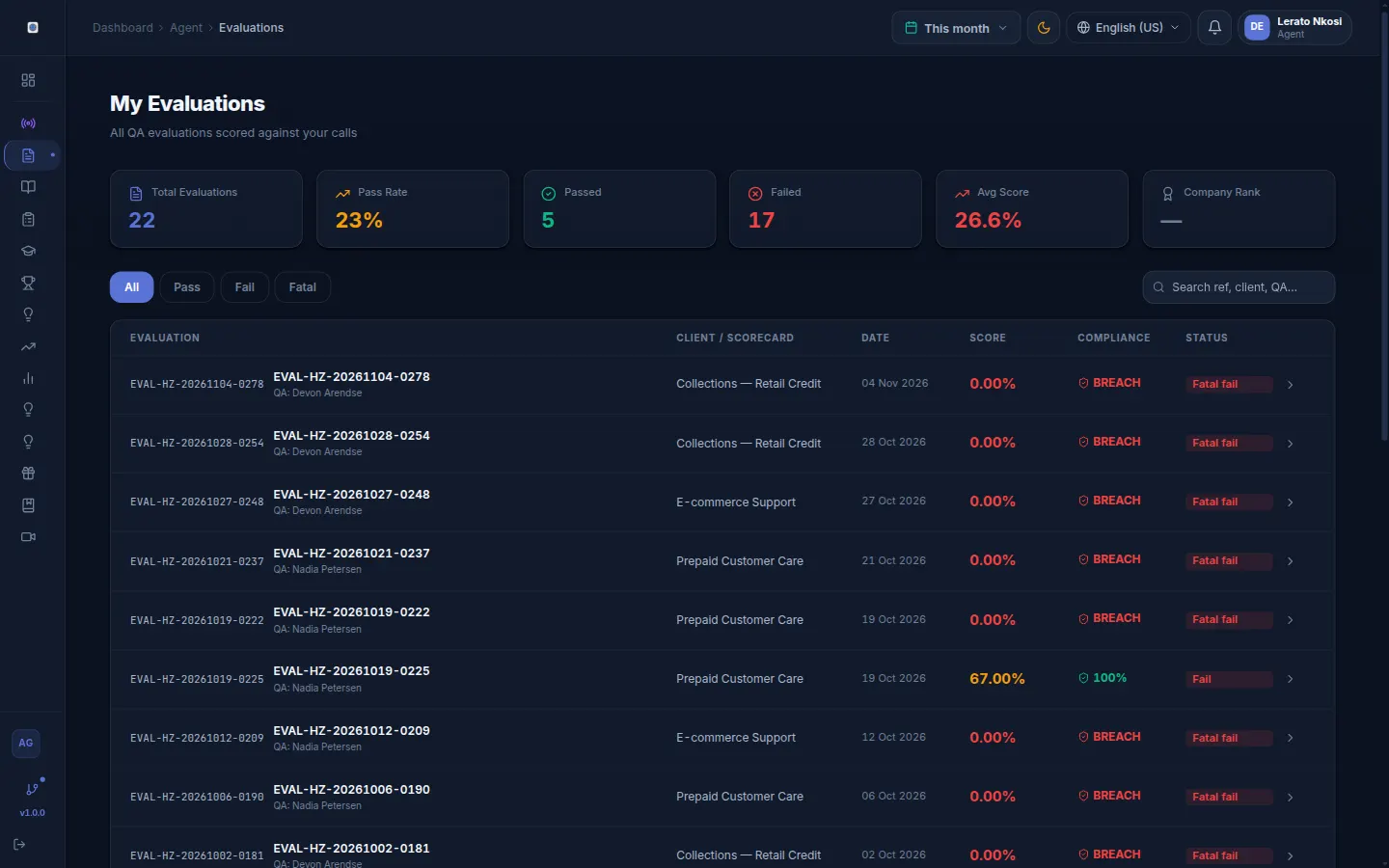
QA scoring, evaluation history, the supervisor floor, ops command, and what an agent sees. Screens from the demo workspace with sample data, not mockups. On a phone, scroll sideways through them.
How the EconX Group runs its own BPO on QUALICORE.
EconX Group (PTY) LTD is a Cape Town-based BPO delivering white-label inbound support, outbound calling, collections, and lead generation to clients across Singapore, Canada, Australia, New Zealand, the UK, EU, US and Africa, with QUALICORE as the QA system on every campaign. EconX Group owns QUALICORE, so this is our own operation, not an independent customer.
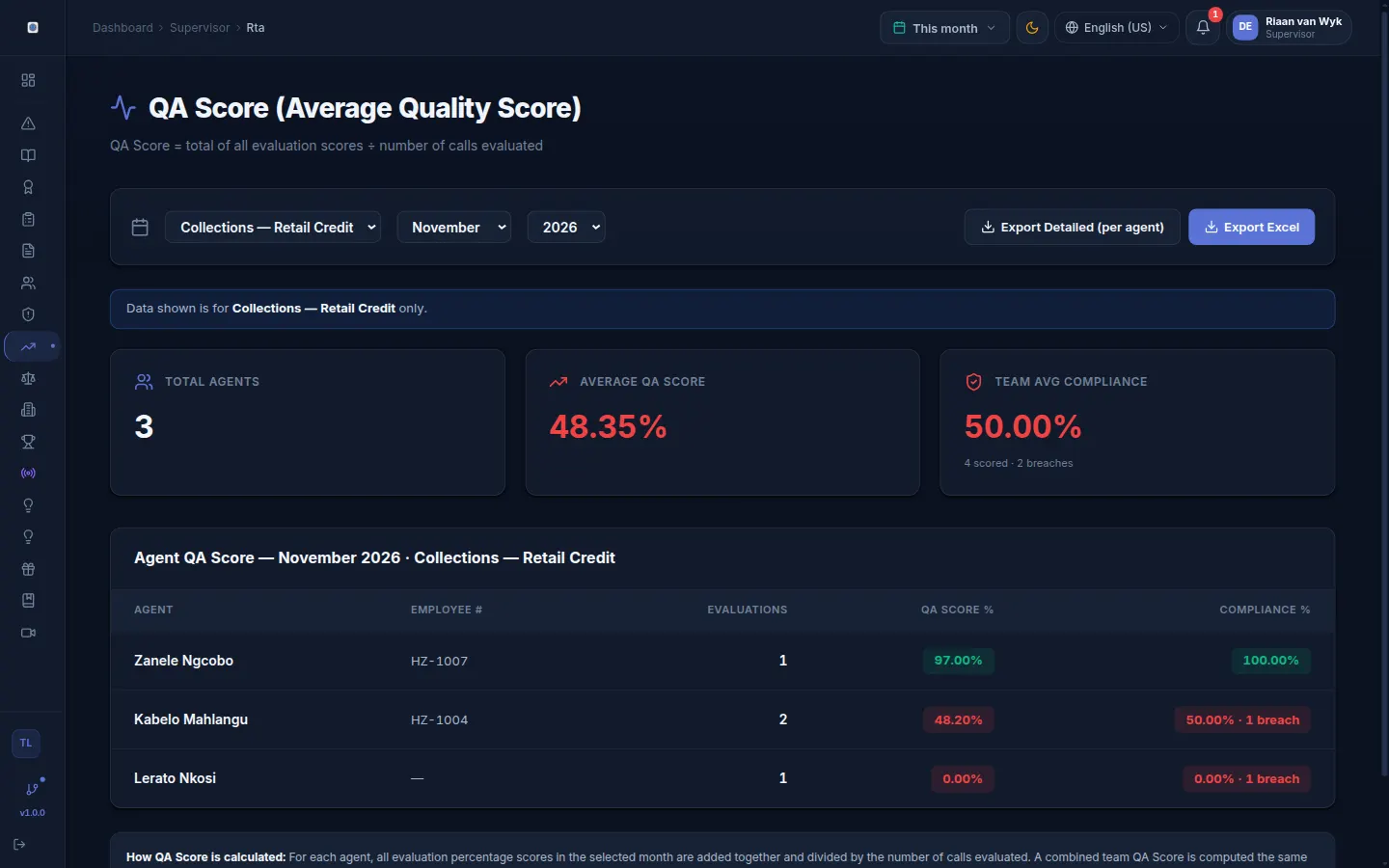
Team scores filtered to one client, Collections Retail Credit. The Excel export carries that client only.
Signed
A person submits each score
Held
Until retention is turned on
Day 1
QA active from go-live
3
Proprietary platforms
What EconX Group runs on QUALICORE
No-code scorecard builder
Scorecards customised per client vertical — financial services, insurance, telco, collections. Each client's criteria built to their specific regulatory environment.
Fatal-fail compliance lines
Compliance lines are scored on every evaluated call. A single fatal line fails the whole evaluation, whatever the total says.
Coaching plans from a fail
When an agent fails an evaluation, QUALICORE opens a coaching plan for their supervisor. The supervisor runs the session and the agent acknowledges it.
PDF exports per client
Each client gets its evaluations and coaching records as PDF, with names and dates. That is a record, not a certificate.
Multi-tenant isolation
Each client's data is completely isolated. EconX manages everything from one dashboard; clients see only their own environment.
AI evaluation drafts
AI drafts the scorecard from the transcript and an analyst checks every line before submitting it.
“VIGIL, QUALICORE and ClockX are built and operated by EconX Group, not bolted-on third-party tools. Every campaign we run is backed by our own stack, and clients can see their QUALICORE dashboards and recordings on request.”
Philani Chade Maswanganye, Founder & CEO
ECONX GROUP (PTY) LTD · Cape Town, Western Cape, SA
DataFirst BPO is a made-up company and this week is an illustration of how the workflow runs. It is not a customer story and has no results to report.
01
Chapter 01
Monday morning
An agent misses a critical compliance prompt
Jake, a new agent at DataFirst BPO (a made-up company), forgets to read the payment consent script on call #CF-4821. If nobody scores that call, the miss surfaces only when someone complains.
✕ Unscored: found later, if at all
✓ Scored: flagged on the evaluation
02
Chapter 02
Monday afternoon
A QA analyst scores the call
Sarah, a QA analyst, scores call #CF-4821, or checks the AI draft line by line and submits it. The consent line is marked fatal on the scorecard, so the evaluation fails and an escalation is raised.
Fatal fail recorded · Escalation raised · Supervisor notified
03
Chapter 03
Monday evening
The supervisor sees it the same day
Marco, Jake's supervisor, gets a notification. He reads the evaluation, opens the coaching plan that the failed evaluation created, and books a session for Tuesday.
Coaching plan created from the fail · 24-hour target
04
Chapter 04
Tuesday morning
Structured coaching, not a chat
Marco runs the session with Jake on QUALICORE's coaching form: root cause, commitment and an improvement plan. Jake acknowledges it in the product, with a timestamp.
Coaching PDF · Agent acknowledgement · Named record
05
Chapter 05
End of month
Month-end report for the client
DataFirst's ops manager downloads the QA score export for that client: agents by average score, pass rate, fatal fails and coaching completed. The client can also open the same numbers in its own portal.
Client-filtered export · Client portal
06
Chapter 06
The months after
What you would watch for
Whether the consent line fails less often for Jake and the team, measured on the random picks in the review queue so the sample is fair. A rise after coaching is a comparison, not proof the coaching caused it.
Line failure rate · Random sample · Sample size shown
Try it on your own calls
Start a free trial, or book a demo and walk through it with us.
NAIVE runs on its own once a session starts: no buttons to press, no manual queries. Seven parts work together on the live call. Live transcription and answers need AI provider keys; the compliance patterns do not.
⚙ VAD Speaker Diarization
⚙ Auto-Trigger Engine
⚙ Groq Whisper STT
⚙ RAG Knowledge Retrieval
⚙ Live Sentiment Analysis
⚙ Compliance Monitor
⚙ Supervisor Tower
Hands-free once the session starts
NAIVE activates automatically when a session starts. VAD detects the speaker, Whisper transcribes, triggers fire, answers surface, and the agent just talks.
Auto-trigger before the agent asks
When "cancel", "competitor" or a custom keyword appears in the live transcript, NAIVE searches your knowledge base and shows a cited script.
Automatic speaker detection
Built-in voice activity detection distinguishes agent from customer speech in real time. 1.3s of silence switches the speaker label without a manual toggle.
Cited answers from your documents
Answers come from your uploaded knowledge base and cite the document section they used, so the agent can check the source before relying on it.
Compliance patterns always on
PCI, GDPR, do-not-sell, and custom compliance patterns run on every transcript line. Flags appear on the agent screen and the supervisor tower simultaneously.
Sentiment and the supervisor tower
Sentiment scoring feeds the supervisor tower during the call. When it drops below the threshold a flag is raised, and the supervisor decides what to do.
Available on all plans · The screen above is an illustration, not a screenshot · Live transcription and answers need AI provider keys
Process
From request to first evaluation
No setup fee. A person sets up your workspace; there is no published go-live time.
01
Request Access
Submit a trial request. There is no published provisioning SLA. No card is taken at this step.
02
Configure Your Scorecards
Build scorecards that match your quality framework, or paste your policy and let AI draft the sections, weights, fatal and compliance flags. Fully editable before you save.
03
Onboard Your Team
Invite QA evaluators, supervisors, and agents. Each role sees only what they need.
04
Review the Results
Read the reports, work the escalations and coaching, and give each client a portal login to see its own results.
Integrations
11 live integrations, more planned
Live tiles send evaluation, fatal-fail and coaching events to the tool you connect. Tiles marked Planned are not connected yet.
Slack
Live
Comms
Posts evaluation, fatal-fail and coaching events to a channel through an incoming webhook.
Microsoft Teams
Live
Comms
Posts the same events as a message card through a Teams incoming webhook.
WhatsApp Business
Live
Comms
Sends a short text summary of each subscribed event through the WhatsApp Cloud API.
Salesforce
Live
CRM
Creates a Quality_Event__c record through the Salesforce REST API for each subscribed event.
HubSpot
Live
CRM
Posts each subscribed event to the HubSpot timeline API with a private-app token.
Zendesk
Live
Helpdesk
Pushes each subscribed event to Zendesk with an API token.
Freshdesk
Live
Helpdesk
Sends each subscribed event to the Freshdesk tickets API with your API key.
Intercom
Live
Helpdesk
Records each subscribed event through the Intercom events API.
WH
Webhooks
Live
Webhooks
HMAC-SHA256 signed JSON for evaluation.submitted, fatal_fail.raised and coaching.completed.
{}
REST API endpoint
Live
Webhooks
The same signed JSON events, delivered to an endpoint you run.
Zapier
Live
Webhooks
Sends each subscribed event to a Zapier catch hook, so a Zap can pass it on.
Genesys Cloud
Planned
Telephony
Credentials can be saved, but QUALICORE does not call Genesys yet. Submit recordings or transcripts instead.
Five9
Planned
Telephony
Credentials can be saved, but QUALICORE does not call Five9 yet. Submit recordings or transcripts instead.
Twilio Flex
Planned
Telephony
Credentials can be saved, but QUALICORE does not call Twilio yet. Submit recordings or transcripts instead.
Amazon Connect
Planned
Telephony
Credentials can be saved, but QUALICORE does not call Amazon Connect yet. Submit recordings or transcripts instead.
Zoho CRM
Planned
CRM
Not connected yet. Use a webhook or Zapier to carry events to Zoho today.
Microsoft Dynamics
Planned
CRM
Not connected yet. Use a webhook or Zapier to carry events to Dynamics today.
@
Email (SMTP / SES)
Planned
Comms
Platform email is sent through Resend. Per-company SMTP settings are not used yet.
Google Workspace
Planned
Productivity
Not connected yet. Calendar invites and Drive recordings are planned.
Microsoft 365
Planned
Productivity
Not connected yet. Outlook invites and SharePoint recordings are planned.
Zoom
Planned
Productivity
Not connected yet. Meeting links for coaching sessions are planned.
Notion
Planned
Productivity
Not connected yet. A webhook can post events to a Notion automation today.
Jira
Planned
Productivity
Not connected yet. Issues for fatal fails are planned; Zapier can create them today.
Power BI
Planned
BI
Not connected yet. Export reports as CSV for Power BI today.
Tableau
Planned
BI
Not connected yet. Export reports as CSV for Tableau today.
Looker
Planned
BI
Not connected yet. Export reports as CSV for Looker today.
Snowflake
Planned
BI
Not connected yet. A warehouse share is planned.
AWS S3
Planned
Storage
Not connected yet. Recording import from your own bucket is planned.
Azure Blob
Planned
Storage
Not connected yet. Recording import from your own container is planned.
Google Cloud Storage
Planned
Storage
Not connected yet. Recording import from your own bucket is planned.
SharePoint
Planned
Storage
Not connected yet. Recording import from document libraries is planned.
Okta
Planned
Identity
Not connected yet. Sign-in is email and password in this release.
Microsoft Entra ID
Planned
Identity
Not connected yet. Sign-in is email and password in this release.
Google SSO
Planned
Identity
Not connected yet. Sign-in is email and password in this release.
Need a tool that is planned or not listed? Talk to us. A signed webhook or Zapier can usually carry the same events in the meantime.
Partner programme
Refer QUALICORE. Earn money.
Anyone can join — free. Get your own referral link and an embeddable widget, share it on your website, WhatsApp, Facebook and beyond, and earn when the call centres and BPOs you refer start paying.
Pricing is set by ECONX GROUP and may change. All invoices include 15% VAT. Agents are counted at billing time, and only active agents are billed.
Leadership
Built by Philani Chade Maswanganye
Philani Chade Maswanganye
Founder & CEO · Group CEO
ECONX GROUP (PTY) LTD · Cape Town, Western Cape
Founder & CEO at ECONX GROUP | Diversified Holding Company | Driving Scalable Solutions & Strategic Investment. Building across BPO · GXC Blockchain · ETFs · VC · AI — with proprietary platforms QUALICORE, VoxLink, ClockX, and Vigil.
ECONX GROUP (PTY) LTD is a diversified South African holding company headquartered in Cape Town (5b Adderley Street). Founded in 2025 by Philani Chade Maswanganye, it builds Africa-facing BPO and contact-centre infrastructure — QUALICORE (AI quality assurance & coaching), VoxLink (enterprise dialer & floor command), ClockX (workforce & payroll), and Vigil (remote floor intelligence) — while pursuing a broader investment and technology thesis across BPO operations, GXC Blockchain, ETFs, venture capital, and AI. B-BBEE Level 1. Serves startups, SaaS, and enterprises worldwide with customer support, lead generation, collections, and back-office systems.
BPO & Contact CentresGXC BlockchainETFsVenture Capital (VC)Artificial Intelligence (AI)
Workforce attendance, leave and payroll for South African teams — GPS clock-in, overtime & public-holiday hours, AWOL alerts, and SARS-aware payslips. Sister product to QUALICORE from ECONX GROUP.
Based at 5b Adderley Street, Cape Town, 8001, we partner with startups and SaaS companies on human-in-the-loop support, AI-assisted triage, and scalable back-office systems.
No POPIA certificate claimed · CIPC Reg. 2026/110163/07 · QUALICORE is a product of ECONX GROUP (PTY) LTD.
ECONX GROUP
Outsource a system, not just agents.
VIGIL — live call-floor surveillance
QUALICORE — QA scoring and coaching
CLOCKX — workforce and payroll
The stack behind every ECONX GROUP campaign: call floor monitoring, QA scoring and verified attendance, running under your brand.
ECONX GROUP Outsourcing
Wholesale BPO delivery from $6.00 per agent hour
High-performance white-label operations for Singapore, Canada, Australia, New Zealand, UK, US, and African markets. Scale with confidence, backed by our proprietary tech stack and Cape Town talent pool.
No setup fee Pilot from 1 seat, 1 week 5-10 days to launch No long-term commitment
Beyond the QUALICORE platform, ECONX GROUP provides end-to-end outsourced contact centre services — from QA agents and team leaders through to full collections and inbound/outbound support operations.
Dedicated QA Agents
Fully trained quality assurance evaluators embedded into your operation — or managed remotely. We own the QA staffing, coaching, and performance management.
Collections Call Centre
Expert collections agents with proven debt recovery strategies, full compliance with NCA and debt collection regulations, and transparent reporting.
Inbound & Outbound Support
Customer service, technical support, sales, and retention teams — scalable from 5 to 500+ seats, provisioned rapidly with our existing talent pipeline.
BPO Staffing & Managed Services
Supervisor teams, team leaders, workforce management, and reporting. We provide the people; you focus on your core business.
Outsourced contact centre teams from ECONX GROUP. Tell us what you need and we'll come back with a proposal.
See the numbers before you talk to anyone
Costs, scope and terms in writing — the same documents we send to clients. No call required, no form wall. Take them to your finance team and check our maths.
Start here
The Real Cost of In-House
A line-by-line comparison of what a UK agent actually costs you — salary, NI, pension, desk, software, supervision — against a fully managed EconX seat. Includes annual savings at 1, 3, 5, 10 and 20 agents.
PDF · 4 pages · costs and savings tables
Rate Card 2026
Every rate, in writing: per seat from £323/week, per hour from $6.00, and the hybrid base-plus-bonus bands for collections and appointment setting. Plus what each rate includes and what you provide.
PDF · 5 pages · all three pricing models
BPO Services Proposal
The full service offering: scope by industry, the three pricing models compared, onboarding from signature to first live call, payment terms, and the data-protection and termination clauses in plain language. Read with the Rate Card above.
PDF · 13 pages · scope, models, terms
Real Estate Appointment Setting
For agencies and brokerages: why leads go cold in under five minutes, what a missed lead costs against a month of managed dialling, and how a pilot runs from lead list to booked appointment.
PDF · 3 pages · sector brief
Facts
What you can check in the product
How QUALICORE works, in facts you can test in the demo. These are not customer results.
1
Company, many clients
Each campaign keeps its own scorecard. Analysts see the clients they are assigned to.
2
Scores on one evaluation
Quality and compliance are calculated separately from the criteria you mark.
ROI
Coaching comparison
The ROI view compares a window before a session with a window after. It does not prove cause.
Log
Audit events
Saved evaluations, drafts and imports write an event with a user and a time. The log is not a certified archive.
ROI
See the impact on your bottom line
Use the calculator with your own numbers. These tiles are not measured customer results.
Plan
List price
Starter R195, Growth R460, Professional R899, Enterprise R1,350 per active agent, excluding VAT.
3–15%
Invoice volume percentage
Applied after the list price: 3% from 10 agents, 6% from 20, 10% from 50, 15% from 100.
30d
Trial
Starter, Growth and Professional publish a 30-day trial. Enterprise does not.
You
Savings
There is no published average saving. Model your own floor on the ROI calculator.
Comparison
How QUALICORE compares on the points it actually ships
This table is QUALICORE’s own description, not an independent ranking.
Billing per active agent✓
OthersCheck with the vendor
Audit log with a name and a time✓
OthersCheck with the vendor
Scorecard can name the disclosures you care about✓
OthersDepends on the product
Prices published in rand✓
OthersCheck with the vendor
Global accessibility✓
Others✓
Auto-escalation (8 triggers)✓
OthersCheck with the vendor
A portal login for each of your clients✓
OthersCheck with the vendor
Published setup-time guaranteeNone
OthersVaries
Published implementation feeNone on this page
OthersVaries
Wholesale BPO hourly rate (ECONX GROUP)From $6.00
OthersVaries
FAQ
Common questions answered
Everything you need to know before getting started
How does automated billing work?+
QUALICORE automatically counts your active agents each month and generates an accurate invoice. No manual spreadsheets, no agent counting, no admin work. Invoices are emailed to you with a complete breakdown. You only pay for agents who were active during the billing period.
Is QUALICORE available outside South Africa?+
The product can be used outside South Africa. ECONX GROUP is based in South Africa. A scorecard can include the disclosures you care about. This is not a statement that a team in another country is a customer.
What currencies do you support?+
We support multiple currencies including ZAR (South African Rand), USD (US Dollar), EUR (Euro), and GBP (British Pound). Pricing is flexible based on your location and can be quoted in your preferred currency. South African clients benefit from local VAT invoicing.
How long does implementation take?+
There is no published implementation SLA. You request access, configure scorecards and invite the team. The trial is 30 days and does not ask for a card.
Do I need to integrate with my telephony system?+
No. QUALICORE is a standalone QA management platform with no telephony connector. You upload the recording or paste the transcript, and your QA evaluators score the call against its reference number. It sits beside whatever phone system you already use.
Does QUALICORE issue a POPIA certificate?+
No. The product can record the criteria you define and store who submitted each evaluation, warning and acknowledgement. That record is not a certificate.
What happens after the 30-day trial?+
You choose a paid plan or the trial ends. No automatic charge is taken when no card is on file. How long a closed workspace is kept is the company retention setting, which does not delete records unless enforcement is turned on.
Can I cancel anytime?+
Yes. No lock-in contracts. Cancel anytime from your admin dashboard. You'll be billed for the current period, then access ends. We can export your data before closure.
Do you offer volume discounts?+
List price is the plan card: Starter R195, Growth R460, Professional R899, Enterprise R1,350 per active agent, excluding VAT. Each plan scales with the team. The invoice then applies a volume percentage: none under 10 active agents, 3% from 10, 6% from 20, 10% from 50 and 15% from 100. Loyalty percentage is separate and depends on subscription age. A larger team does not by itself require a different plan.
What is the wholesale BPO rate?+
Wholesale BPO delivery starts at $6.00 per agent hour for standard inbound/outbound campaigns aligned to South African business hours. This includes our full technology stack (VIGIL, QUALICORE, ClockX) with no setup fees and a 1-week pilot option.
What support do you provide?+
Email support for all plans (response within 24 hours). Enterprise plans include priority support, dedicated account manager, and custom onboarding. We also provide comprehensive documentation and video tutorials.
Can I use QUALICORE for multiple clients?+
Absolutely. QUALICORE is built for multi-tenant BPO operations. Each client company gets their own secure environment, branded scorecards, separate users, and isolated reporting. Perfect for outsourcing firms.
Global Compliance
Compliance lines you can score
A scorecard can include the disclosures a team cares about. Storing that evaluation is not a certificate for POPIA, GDPR, HIPAA, PCI or any other law.
POPIA
South Africa
Protection of Personal Information Act No. 4 of 2013. You can put those disclosures on a scorecard and keep who submitted the evaluation. That is not a certificate.
Criteria you write yourself
Named submitter on the evaluation
Not a legal opinion
Not a certificate
GDPR
European Union
General Data Protection Regulation (EU) 2016/679, for operations that handle data about people in the EU. You can score consent and disclosure lines and set how long records are kept.
Consent and disclosure lines you write
Retention setting with a legal hold
Named submitter on the evaluation
Not a certificate
CCPA / CPRA
California, USA
California Consumer Privacy Act and California Privacy Rights Act, for US-facing teams. A scorecard can check that agents give the disclosures and honour opt-outs.
Disclosure and opt-out lines you write
Named submitter on the evaluation
Not a legal opinion
Not a certificate
HIPAA
USA — Healthcare
Health Insurance Portability and Accountability Act. QUALICORE does not offer a business associate agreement on this site. Do not load protected health information without a written agreement with ECONX GROUP.
Role-based access
Audit log of quality actions
Training records in the built-in courses
No BAA offered here
PCI DSS
Global — Payments
Payment Card Industry Data Security Standard. A scorecard can check that agents do not take card numbers on the call, and Live Assist flags a card number it hears.
Card-handling lines you write
Card-number guardrail in Live Assist
Compliance score per evaluation
Not a PCI attestation
TCPA
USA — Telecom
Telephone Consumer Protection Act, for US outbound calling. A scorecard can check consent and do-not-call handling, and a breach raises an escalation.
Script and consent lines you write
Do-not-call guardrail in Live Assist
Escalation on a compliance breach
Not a legal opinion
No SOC 2 report yet
Security posture
QUALICORE does not have an independent SOC 2 or ISO 27001 certificate. Access is role-based and actions are written to an audit log. That is not an attestation.
Role-based access control
Audit log of quality actions
Tenant separation by company
No certification to cite
FTC Safeguards Rule
USA — Financial
FTC Standards for Safeguarding Customer Information, for US financial services. QUALICORE keeps a record of evaluations, training and escalations that you can use as evidence of your QA programme.
Role-based access
Training and coaching records
Escalation history
Not a legal opinion
Note: QUALICORE keeps the records, audit log and QA workflow that can support your compliance work. It does not provide legal advice, and it holds no certification. Ask qualified legal counsel in your jurisdiction about your own obligations. Coaching records and written warnings carry names and dates for processes under the LRA No. 66 of 1995 and BCEA No. 75 of 1997.
Your contact centre deserves better QA.
Score the interactions you submit, coach the miss, and give each client a login to see its own results.